
Introduction
MS Flow is evolving as a tremendous tool to build workflow and business processes between different apps and services. With the help of MS Flow, different actions can be used and executed successfully as per your need. Professional developers can use Azure Functions to extend the capabilities of MS Flow while keeping the flow lightweight and putting business logic/calculations in the Azure function, hiding technical details from others.
There are two ways of calling an Azure function from MS Flow.
- Using custom Connector
- Using HTTP action in flow
This post will emphasize calling an Azure function from MS Flow using an HTTP action with Azure Active Directory OAuth Authentication.
Follow the below steps in sequence to call an Azure Function from Flow.
Configure AAD in Function APP
At the outset, we need to configure the Function APP’s authentication. Usually, any function app’s authentication will be set as ‘Anonymous’
To set the authentication, follow the below steps
- Go to function app à Platform Features
- Click on Authentication.
- You should see that by default authentication is off.
- Set App service authentication ‘ON’. You will see below screen

- As we can see there are a number of options for authentication using AAD, Facebook, Google, Microsoft, and Twitter.
- Select 'Log In with Azure Active Directory' in 'Action to take when request is not authenticated' dropdown.
- Click on Azure Active Directory
- Set 'Management Mode' as Express. In express mode, an AAD application will be created for Function app or an existing AAD application can be selected.
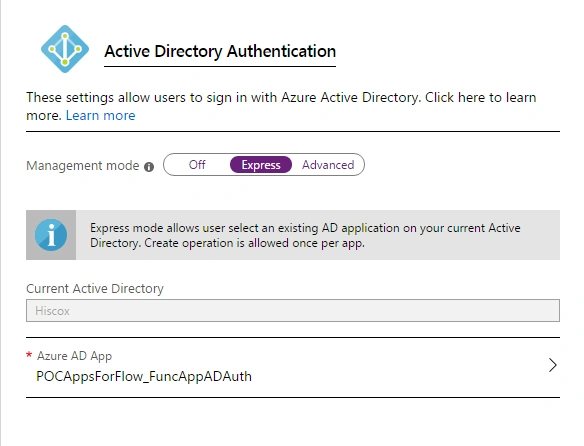
- Click on Save.
- If you go to Azure Active Directory, you can see the AAD application is created.

- Now we need to set the reply URL for this function app. To set reply URL, go to 'Authentication' under manage and add one redirect URL as shown below

*To get AZURE FUNCTION APP URL, go to function app and copy URL.
- Next, we need to copy the application ID as it is needed later while calling this function from flow.
- At last we need to create one client secret key under 'Certificates & Secrets' and copy the secret key somewhere because the value will be hidden after creating it.
Creating an Azure Function in Function APP
- Create an in-portal C# HTTP Trigger azure function with some name.

- To test this function, click on Get Function URL and paste it on the browser. Now as we can see that it expects a 'name' parameter so please provide name parameter and press 'Enter'.

Create MS Flow for calling Azure Function
In this section, we will create a flow, which will call the function app.
- Create a blank workflow and select the trigger action as manual.
- Click on Add Next Step and select HTTP Service with all the setting defined as below

- Click on save and click on test. If everything is fine than flow should run successfully as below.

- If you extend the HTTP action, you can see the output from Azure function.

In this post, we have seen how to call an MS Azure Function (with AAD authentication enabled) from MS Flow.
Ano MepaniPosted Oct 23, 2019, 11:43 AM
Http connector are premiun connextoe right? It will require separate license right?