

Introduction to this tutorial
We will create a .Net Core API project using Visual Studio 2019 and framework version 3.1 We will also create a database and table in the database (to perform the CRUD Operations) using the SQL Server Management Studio 2019. You can use SQL Server version 2008 to the latest version.
I hope you will enjoy this tutorial and that it will be helpful for you.
Let's see the flow step by step. First, we will create a database and a table inside the created database. Use the below command to create the database materials.
- Create Database APICoreDB
- Use APICoreDB
- Create table Employee(Id int primary key identity(1,1), Name varchar(50), Department varchar(20), Salary decimal(10,2))
- Insert into Employee(Name, Department, Salary)Values('John', 'DotNet', 50000)
- Select * from Employee
Create the Web API Project using Visual Studio 2019.
Steps
- Open Visual Studio
- Select Create a new project
- Select "ASP.NET Core Web Application (C#)" from the left panel
- Select "ASP.NET Core Web Application" from the right-side panel
- Now Click on the "Next" button 6. Give the Project name as "WebAPICore"
- Select the location or leave it as it is
- Now click on the "Create" button
You can watch this complete video here.
Now add three folders in the created project with the name "Models", "Services" and "IServices".
Now add the required references to work with the SQL Server database and .Net Framework
To do this, follow these steps:
Go to Tools menu => NuGet Package Manager =>Package Manager Console
Run the below commands
PM> Install-Package Microsoft.EntityFrameworkCore.SqlServer
PM> Install-Package Microsoft.EntityFrameworkCore.Tools
Now configure the database and add model classes. To do this, follow these steps:
Go to Tools menu => NuGet Package Manager =>Package Manager Console
Run the below commands:
PM> Scaffold-DbContext "Server=DESKTOP-TA2C85E\SQLEXPRESS; Database=APICoreDB; User ID=sa;Password=123456;" Microsoft.EntityFrameworkCore.SqlServer -OutputDir Models
After running the above command you are able to see two files are added into the Models folder with the name
"APICoreDBContext.cs" and "Employee.cs"
Add connection string in the appsettings.json file.
"DbConnection": "Server=DESKTOP-TA2C85E\\SQLEXPRESS;Database=APICoreDB;User ID=sa;Password=123456;"
After adding the above line, your file will look as below:
- {
- "Logging": {
- "LogLevel": {
- "Default": "Information",
- "Microsoft": "Warning",
- "Microsoft.Hosting.Lifetime": "Information"
- }
- },
- "AllowedHosts": "*",
- "DbConnection": "Server=DESKTOP-TA2C85E\\SQLEXPRESS;Database=APICoreDB;User ID=sa;Password=123456;"
- }
Add a class in the folder "Services" name it as "EmployeeService.cs".
Add Interface in the folder "IServices" and name it as "IEmployeeService.cs".
Now it's time to manage dependency injection.
To do this open the Startup.cs file.
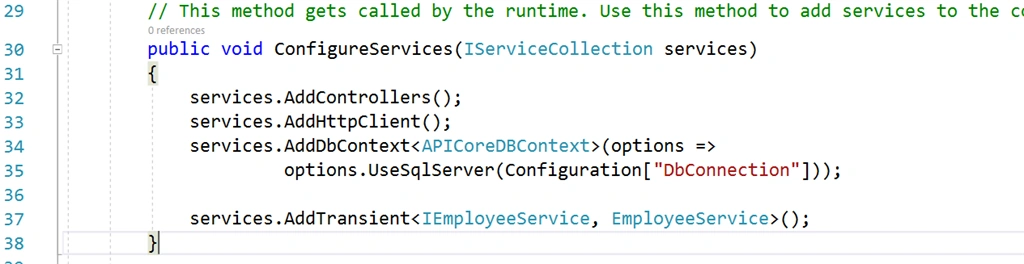
Add the below lines inside the function ConfigureServices.
- services.AddHttpClient();
- services.AddDbContext<APICoreDBContext>(options =>
- options.UseSqlServer(Configuration["DbConnection"]));
- services.AddTransient<IEmployeeService, EmployeeService>();
After adding the lines your ConfigureServices function will look as below.
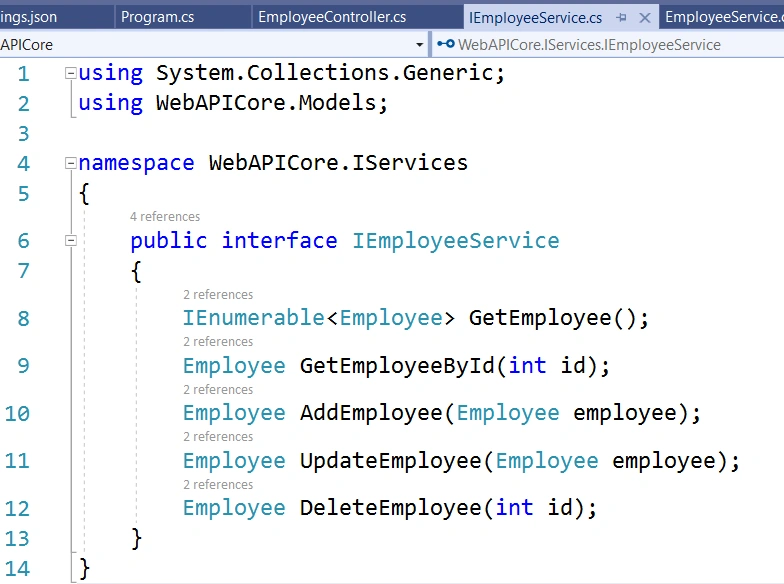
Now add the interface methods inside the file "IEmployeeService.cs".
- IEnumerable<Employee> GetEmployee();
- Employee GetEmployeeById(int id);
- Employee AddEmployee(Employee employee);
- Employee UpdateEmployee(Employee employee);
- Employee DeleteEmployee(int id);
After adding the above methods your "IEmployeeService.cs" file will look like below,
Now implement the interface method inside the file "EmployeeService.cs"
- You need to inherit interface then
- Create an instance of the DBContext class using the constructor
So that we can use it to communicate with the database as below,
- APICoreDBContext dbContext;
- public EmployeeService(APICoreDBContext _db)
- {
- dbContext = _db;
- }
Now implement all the five methods that you have created in the above steps.
After implementing all the functions your file will look as below,
- using Microsoft.EntityFrameworkCore;
- using System;
- using System.Collections.Generic;
- using System.Linq;
- using System.Threading.Tasks;
- using WebAPICore.IServices;
- using WebAPICore.Models;
- namespace WebAPICore.Services {
- public class EmployeeService: IEmployeeService {
- APICoreDBContext dbContext;
- public EmployeeService(APICoreDBContext _db) {
- dbContext = _db;
- }
- public IEnumerable < Employee > GetEmployee() {
- var employee = dbContext.Employee.ToList();
- return employee;
- }
- public Employee AddEmployee(Employee employee) {
- if (employee != null) {
- dbContext.Employee.Add(employee);
- dbContext.SaveChanges();
- return employee;
- }
- return null;
- }
- public Employee UpdateEmployee(Employee employee) {
- dbContext.Entry(employee).State = EntityState.Modified;
- dbContext.SaveChanges();
- return employee;
- }
- public Employee DeleteEmployee(int id) {
- var employee = dbContext.Employee.FirstOrDefault(x => x.Id == id);
- dbContext.Entry(employee).State = EntityState.Deleted;
- dbContext.SaveChanges();
- return employee;
- }
- public Employee GetEmployeeById(int id) {
- var employee = dbContext.Employee.FirstOrDefault(x => x.Id == id);
- return employee;
- }
- }
- }
Now Create the Controller, To do this Right-click on the Controllers folder then,
- Choose "Add" Option then
- Choose "Controller..." then
- Select "API Controller - Empty" from the listed item then
- Click on the "Add" button then
- Provide the name to the controller as "EmployeeController.cs" and then
- Click on the "Add" button
The controller will be created and now we have to write the API methods in it.
Now we need to create five APIs method in the controller.
Before adding the API method, we need to create an instance of the IEmployeeService interface and assign it by using the Constructor
so that we can call them to achieve our goal, to do this add the below lines,
- private readonly IEmployeeService employeeService;
- public EmployeeController(IEmployeeService employee)
- {
- employeeService = employee;
- }
After implementing all the five methods your controller file will look like as below,
- using System.Collections.Generic;
- using Microsoft.AspNetCore.Mvc;
- using WebAPICore.IServices;
- using WebAPICore.Models;
- namespace WebAPICore.Controllers {
- [Route("api/[controller]")]
- [ApiController]
- public class EmployeeController: ControllerBase {
- private readonly IEmployeeService employeeService;
- public EmployeeController(IEmployeeService employee) {
- employeeService = employee;
- }
- [HttpGet]
- [Route("[action]")]
- [Route("api/Employee/GetEmployee")]
- public IEnumerable < Employee > GetEmployee() {
- return employeeService.GetEmployee();
- }
- [HttpPost]
- [Route("[action]")]
- [Route("api/Employee/AddEmployee")]
- public Employee AddEmployee(Employee employee) {
- return employeeService.AddEmployee(employee);
- }
- [HttpPut]
- [Route("[action]")]
- [Route("api/Employee/EditEmployee")]
- public Employee EditEmployee(Employee employee) {
- return employeeService.UpdateEmployee(employee);
- }
- [HttpDelete]
- [Route("[action]")]
- [Route("api/Employee/DeleteEmployee")]
- public Employee DeleteEmployee(int id) {
- return employeeService.DeleteEmployee(id);
- }
- [HttpGet]
- [Route("[action]")]
- [Route("api/Employee/GetEmployeeId")]
- public Employee GetEmployeeId(int id) {
- return employeeService.GetEmployeeById(id);
- }
- }
- }
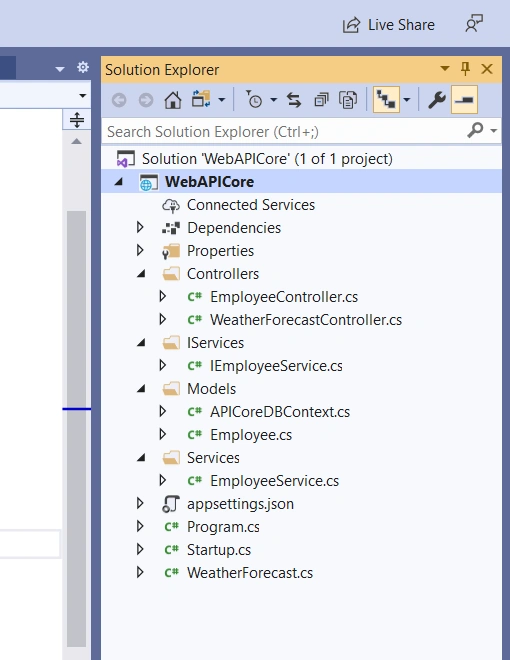
After doing all the above work, your project structure will look like as below screenshot
That's it for this tutorial. I Have covered the How to create CORE API projects using Visual Studio 2019 and .Net Core Version 3.1.
That's it for this tutorial. I Have covered the How to create CORE API projects using Visual Studio 2019 and .Net Core Version 3.1.
We have created the Project Structure as we work in the realtime application and then created the Interface methods and those are the methods that are implemented into the service class. In the Controller, we have access to those all the methods.
I hope you enjoyed this tutorial. If you found this tutorial helpful then please like this tutorial -- that really motivates me to make more useful tutorials.
hossein eskandaryPosted Jan 11, 2021, 11:15 AM
Hi The question I have is how can I now give this Asp.net core api project to a .net framework console project when I get a User and Pass inside the API? Is it possible to do this at all? Then the console project takes these values and connects to Dynamic crm and performs the CRUD operation and returns the READ result to the API as a Response?
Bhuvanesh MohankumarPosted Oct 8, 2020, 10:03 AM
Good one, Why you selected Entity framework over ADO.Net, any specific reason [As EF has delay while handling huge data], also what Authentication is implemented in API service access like Oauth or JWT. Someone can suggest the best Authentication.
Mukesh SagarPosted Sep 1, 2020, 11:20 AM
Nice tutorial, pl add the sample project code also that much more beneficial.
lsj lsjPosted Aug 4, 2020, 8:58 PM
Very informative and Great tutorial
Rohit RaoPosted Aug 3, 2020, 2:35 PM
This article looks good for a beginner. It would be good if you can add a files/folder structure of your project.
Khaja MoizuddinPosted Aug 2, 2020, 1:59 PM
Very interesting article Gautham, looking forward to learn more from you....
Hamid KhanPosted Jul 31, 2020, 10:36 AM
Thanks for sharing..........................
Hamid KhanPosted Jul 31, 2020, 10:36 AM
Good start,...............Keep it up................