

Hello Testers and Developers, Have you ever struggled to understand the CSS styles applied to an element on a webpage?

CSSViewer can be your new best friend! This browser extension, available for Chrome, Firefox, and Edge, simplifies your development and QA workflow by instantly displaying the CSS properties of any element you hover over.
What is CSSViewer?
- CSSViewer is a browser extension that’s available for popular browsers such as Chrome, Firefox, Edge, and more.
- CSSViewer can help you overview any style of an element on a web page at first sight.
- Just hover over any DOM element and view the CSS instantly.
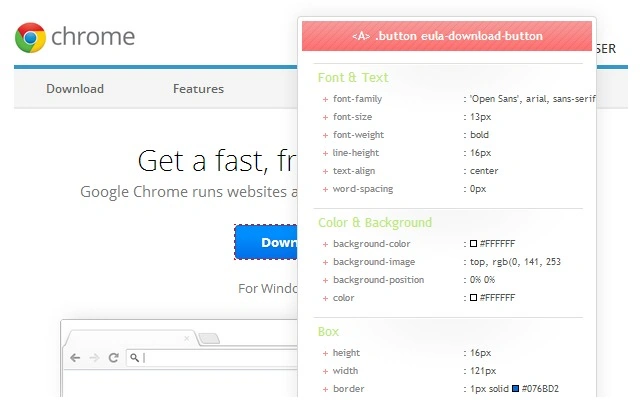
image from Chrome web store CSSViewer extension.
What CSSViewer Can Do?
CSSViewer can display the following CSS properties.
- Font size
- Font family
- Font weight
- Line height
- Text Color
- Background color
- Border
- Margin
- Padding
- Width
- Height
How to Install and Use CSSViewer?
- Click on the below link and click on Add to Chrome https://chromewebstore.google.com/detail/cssviewer/ggfgijbpiheegefliciemofobhmofgce?hl=en
- Once installed, enable the CSSViewer extension and consider pinning it to your browser’s toolbar for quick access as we will be using it frequently.

- Click on the CSSViewer extension icon and hover over any element on the webpage to see the CSS styles popping up.
Additional Tips
- CSSViewer can be used in conjunction with the Chrome Developer Tools to get a more complete picture of a webpage’s CSS.
- CSSViewer is a great tool for learning CSS.
I hope this blog post has been helpful. If you have any questions, please feel free to leave a comment below.
Here are some additional resources that you may find helpful.
I would also like to add that CSSViewer is a great tool for developers who are new to CSS. It can help them to understand how CSS works and how to use it to style their web pages.
Join the conversation! Your thoughts help the community grow.