
Here you can find the working example Code.
What is Dapper?
- Dapper is a popular simple object mapping tool and nothing but an Object Relational Mapping(ORM).
- If you don't want to spend hours writing code to map query results from ADO.NET data readers to instances of those objects, Dapper is very useful for that.
- It not only allows developers to map relational database tables with .NET objects but also allows them to execute SQL queries in the database. It also gives flexibility as they can use tables, stored procedures, and views directly in the databases.
Is Dapper secure?
Dapper is the easiest and most secure way to buy and store all your digital assets from the groundbreaking apps and games powered by Flow. The Metaverse is here.
Is Dapper a micro ORM?
- Dapper is a Mini micro ORM or a simple object mapper framework that helps to map the native query output to a domain class or a C# class. It is a high-performance data access system built by the StackOverflow team and released as open-source.
- Here you can find all SO-thread
What is the fastest ORM?
I've created one example based on the example result I can say - Dapper is faster than SQL & Entity Framework.
Extension methods
Dapper extends the IDbConnection interface with these various methods,
- Execute
- Query:
- QuerySingle:
- QuerySingleOrDefault:
- QueryFirst:
- QueryFirstOrDefault:
- QueryMultiple:
Note
Here you can find the all the method details - Dapper methods
How does a dapper become a king?
Let's create one short example. Let us have one table “Employee” namely whatever you prefer.
Employee table
| Column | Type |
| ID | Int NOT NULL - PK |
| Name | NVARCHAR (50) NULL |
| Dob | DATE NULL |
| Mob_no | VARCHAR (15) NULL |
| Salary | DECIMAL (18,12) NULL |
| Is_Approved | BIT NULL |
Note
In the above table you can see we used almost all data types on a regular basis.
Let’s create a table and fill the 1 Million record in the tables.
Table scripts
CREATE TABLE [dbo].[employee] (
    [Id]          INT           IDENTITY (1, 1) NOT NULL,
    [Name]        NVARCHAR (50) NULL,
    [Dob]         DATE          NULL,
    [Mob_no]      VARCHAR (15)  NULL,
    [Salary]      DECIMAL (18,12)  NULL,
    [Is_Approved] BIT           NULL,
    CONSTRAINT [PK_employee] PRIMARY KEY CLUSTERED ([Id] ASC)
);
Using the while loop fill the 1 Million data into the table.
Declare @Name nvarchar(50)
Declare @Dob Date
Declare @Mob_no VARCHAR(15)
Declare @Salary Decimal(18,12)
Declare @Is_Approved bit
DECLARE @counter int = 1


WHILE(@counter <= 1000000)
BEGIN
    SET @Name = CONCAT('Name_',@counter);
	SET @Dob = GETDATE()+@counter;
	SET @Mob_no = CONCAT('12345678_',@counter);
	SET @Salary = (10+@counter)
	SET @Is_Approved = 1

    INSERT INTO employee([Name],[Dob],[Mob_no],[Salary],[Is_Approved]) VALUES (@Name,@Dob,@Mob_no,@Salary,@Is_Approved);
    Set @counter = @counter+1;
END
Note
All records are inserted now to check the table data size.
You can check your table size using this store procedure.
exec sp_spaceused ‘employee’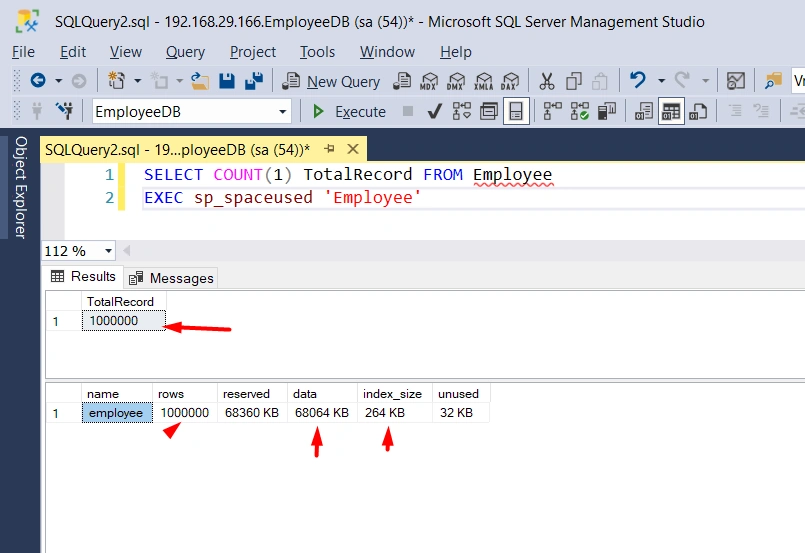
Here you can see almost 67MB of data present in the table.
Another way you can find the storage of the data using an SQL server.
Steps
- Open your SQL Server
- Navigate you're working database
- Expand your tables folder -> Right-click on your table -> Click on properties menu at the last.
- Below popup is visible

*Let’s create a sample application
    //Employee Class
	public partial class employee
    {
        public int Id { get; set; }
        public string Name { get; set; }
        public Nullable<System.DateTime> Dob { get; set; }
        public string Mob_no { get; set; }
        public Nullable<decimal> Salary { get; set; }
        public Nullable<bool> Is_Approved { get; set; }
    }

	//Home Controller
	public class HomeController: Controller
    {
        private readonly string _connectionString = "{YOUR_CONNECTION}";
        SqlConnection con;
        SqlDataAdapter da;
        DataSet ds = new DataSet();
        List<employee> emp = new List<employee>();
        private demo_databaseEntities dd = new demo_databaseEntities();

        public ActionResult SQL()
        {
            Debug.Write("\nSQL Process Start => " + DateTime.Now.ToString("HH:mm:ss.ffffff"));
            con = new SqlConnection(_connectionString);
            da = new SqlDataAdapter("select * from employee", con);
            da.Fill(ds);
            foreach (DataRow dr in ds.Tables[0].Rows)
            {
                emp.Add(new employee()
                {
                    Id = Convert.ToInt32(dr["Id"]),
                    Name = Convert.ToString(dr["Name"]),
                    Dob = Convert.ToDateTime(dr["Dob"]),
                    Mob_no = Convert.ToString(dr["Mob_no"]),
                    Salary = Convert.ToDecimal(dr["Salary"]),
                    Is_Approved = Convert.ToBoolean(dr["Is_Approved"])
                });

            }
            Debug.Write("\nSQL Process End => " + DateTime.Now.ToString("HH:mm:ss.ffffff"));
            //Some process for paging
            return Json(new { count = emp.Count(), data = emp.Take(10000)}, JsonRequestBehavior.AllowGet);
        }

        public ActionResult Dapper()
        {
            Debug.Write("\nDapper Process Start => " + DateTime.Now.ToString("HH:mm:ss.ffffff"));
            con = new SqlConnection(_connectionString);
            emp = con.Query<employee>("select * from employee").ToList();
            Debug.Write("\nDapper Process End => " + DateTime.Now.ToString("HH:mm:ss.ffffff"));
            //Some process for paging
            return Json(new { count = emp.Count(), data = emp.Take(10000) }, JsonRequestBehavior.AllowGet);
        }

        public ActionResult EntityFramework()
        {
            Debug.Write("\nEF Process Start => " + DateTime.Now.ToString("HH:mm:ss.ffffff"));
            emp = dd.employees.ToList();
            Debug.Write("\nEF Process End => " + DateTime.Now.ToString("HH:mm:ss.ffffff"));
            //Some process for paging
            return Json(new { count = emp.Count(), data = emp.Take(10000) }, JsonRequestBehavior.AllowGet);
        }
    }
*SQL

*Dapper

*Entity Framework

Conclusions
Here we can see 10 lacs record dapper executing in 4 seconds while we are using entity framework it will take 10 seconds and for SQL it will take 7-8 seconds. So Dapper is faster than any other.
Here you can find the working example Code.
Offical and helpful link for Dapper
Ravi MoriPosted Dec 15, 2021, 12:43 PM
Nice article. Thank you for more details provided in Dapper.