

Before going for SharePoint, let’s see something about IIS.
What is an IIS?
Internet Information Services is a web server where we can host the application to publish it to outside or to the world.
- By default, an IIS comes along with an Operating system.
- There are two types of Operating systems, Client-side OS, and Server-side OS.
- Some mostly used Server-side Operating systems,
- Windows Server 2008 --------------------IIS 7.0
- Windows Server 2008 R/2 -------------------- IIS 7.5
- Windows Server 2008 --------------------IIS 8.5
- Windows server 2012R/2 ------------------- IIS 8.5
Note: When we create an application on SharePoint it gets deployed on IIS.
What is SharePoint?
- In Simple terms, SharePoint is a collaboration portal where we can share information or data globally or internally or either, based on the requirements. i.e., a common point of collaboration.
- SharePoint’s content management feature facilitates organizations or users to securely store, share or collaborate with each other.
In one of the books, it is elaborated like,
In an organization, there are various departments such as IT, Finance, HR, Sales, Marketing, etc. If they want to share some documents with other departments or teams to work together, those documents can be placed in a particular repository and everyone who has access to that repository can access those documents and work together. And this repository becomes the central point for all departments or teams – this is how the point is being shared by all respective departments or teams – hence the name is SharePoint. A secure place to store, organize, share, and access information from any device. All you need is a web browser
Why should we use SharePoint?
Mainly, if there is a large amount of data then we can easily store it on SharePoint. Let’s suppose we are running different projects, different clients and they have different, different data, refer to the below diagram.
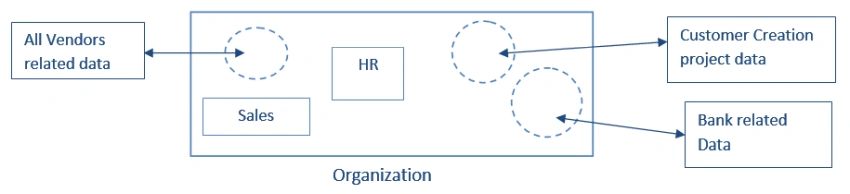
- Suppose you want to access only customer process-related information I can share it that only, client-wise.
- Suppose an HR person wants to get information related to the respective department, those only can be shared.
- Likewise different respective access can be shared, can be made separate instances (subsite/ groups), securely providing the permission levels.
Key features of SharePoint
- Various out-of-the-box site templates like team site, publishing site, community site, etc, and based on the need we can decide which template to use.
- It provides a search portal for searching in-site.
- It provides add-ins to increase the power of SharePoint.
- It provides content management (file sharing, check-in, check out, versioning).
- It provides good security.
- Workflow – it has its own workflow; however, we can develop our custom workflow, and we can even integrate with third-party workflow products like Nintex.
- Custom form – we can develop and integrate any custom form like Visual Studio, PowerApps, Nintex form, etc.
Different ways to access SharePoint
There are two ways we can access and use SharePoint,
- SharePoint On-Premises
- SharePoint Online (Office 365)
SharePoint On-Premises
- Organizations must install and maintain everything in their network. Like organizations must install servers, SharePoint, SQL, etc. And then maintain by their own SharePoint admin team.
- SharePoint 2019 is the latest on-premises version and before that Microsoft released various versions like SharePoint 2016, 2013, 2010, MOSS 2007, etc.
SharePoint Online
- Microsoft will provide SharePoint as a service that organizations can use. You can only pay for whatever you are using. According to your requirement, you can take the license which best fits your organization’s requirements.
- In this case, the Organization can save hardware, software, and maintenance cost.
- We can get SharePoint Online from Microsoft cloud service “Office 365”.
Join the conversation! Your thoughts help the community grow.