

In this article we will learn jQueryUI. This is the first part of this article series. UI stand for User interface and it's used for creating user-interactive applications using jquery and Html.
Prerequisites
Basic Knowledge of:
- HTML
- Javascript
- Css
In this part we are going to learn about these jQuery UI methods:
- Draggable
- Resizable
- Sortable
Open Visual Studio and create a new project -- rename it as jQuery and download the required Jquery reference file from the Jquery Website or Nuget package manager and add the reference of the jquery file into the page's head section
- <script src="Scripts/jquery-1.10.2.js"></script>
- <script src="Scripts/jquery-ui.js"></script>
- <link href="Scripts/jquery-ui.css" rel="stylesheet" />
Now first we will learn the draggable method.
Draggable
This method is used to create a draggable component in our application.
Add 3 divs for a demo of the draggable method and add a style to these divs.
Add Css in head section
- .div1{
- height:160px;
- width:80px;
- border:1px solid Blue;
- background-color:orange
- }
Add these divs in the body section of our page
- <div>
- <div id="dvi1" class="div1">
- <h5 style="text-align:center">Div1</h5>
- </div>
- <div id="dvi2" class="div1">
- <h5 style="text-align:center">Div2</h5>
- </div>
- <div id="dvi3" class="div1">
- <h5 style="text-align:center">Div3</h5>
- </div>
- </div>
Now add the following code in script tag in head section to make it draggable to these divs.
- <script>
- $(document).ready(function () {
- $("#dvi1,#dvi2,#dvi3").draggable();
- });
- </script>
- <!DOCTYPE html>
- <html>
- <head>
- <title></title>
- <meta charset="utf-8" />
- <script src="Scripts/jquery-1.10.2.js"></script>
- <script src="Scripts/jquery-ui.js"></script>
- <link href="Scripts/jquery-ui.css" rel="stylesheet" />
- <script>
- $(document).ready(function () {
- $("#dvi1,#dvi2,#dvi3").draggable();
- });
- </script>
- <style>
- .div1 {
- height: 160px;
- width: 80px;
- border: 1px solid Blue;
- background-color: orange;
- }
- </style>
- </head>
- <body>
- <div>
- <div id="dvi1" class="div1">
- <h5 style="text-align:center">Div1</h5>
- </div>
- <div id="dvi2" class="div1">
- <h5 style="text-align:center">Div2</h5>
- </div>
- <div id="dvi3" class="div1">
- <h5 style="text-align:center">Div3</h5>
- </div>
- </div>
- </body>
- </html>
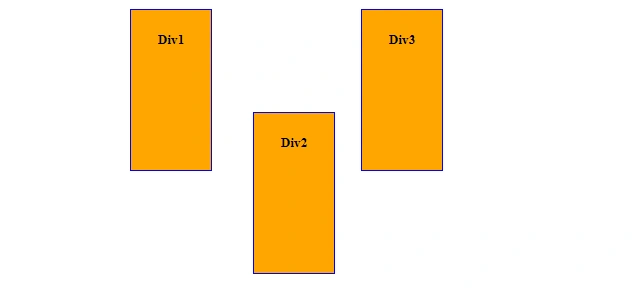
Run the project and check the draggable div. We can see the divs are draggable.

Sortable
We can rearrange elements using the Sortable method. Check out this demo to see sortable components.
- <!DOCTYPE html>
- <html>
- <head>
- <script src="Scripts/jquery-1.10.2.js"></script>
- <script src="Scripts/jquery-ui.js"></script>
- <link href="Scripts/jquery-ui.css" rel="stylesheet" />
- <script>
- $(document).ready(function () {
- $("#s1").sortable();
- });
- </script>
- <style>
- .d1{
- border:4px solid blue;
- padding:20px;width:50px;margin:10px;
- }
- </style>
- </head>
- <body>
- <div id="s1">
- <div class="d1">Jaipur</div>
- <div class="d1">Delhi</div>
- <div class="d1">Noida</div>
- <div class="d1">Gurgaon</div>
- <div class="d1">Ajmer</div>
- </div>
- </body>
- </html>
Run the Project and check the result,

Click on any city and drag it from its place and drop it in another place
Resizable
By using this method we can resize an element's size
- <!DOCTYPE html>
- <html>
- <head>
- <title></title>
- <meta charset="utf-8" />
- <script src="Scripts/jquery-1.10.2.js"></script>
- <script src="Scripts/jquery-ui.js"></script>
- <link href="Scripts/jquery-ui.css" rel="stylesheet" />
- <script>
- $(document).ready(function () {
- $("#dvi1,#dvi2").resizable();
- });
- </script>
- <style>
- .div1 {
- height: 160px;
- width: 80px;
- border: 1px solid Blue;
- background-color: orange;
- margin:10px;
- }
- </style>
- </head>
- <body>
- <div>
- <div id="dvi1" class="div1">
- <h5 style="text-align:center">Div1</h5>
- </div>
- <div id="dvi2" class="div1">
- <h5 style="text-align:center">Div2</h5>
- </div>
- </div>
- </body>
- </html>
Run the project and check the browser.
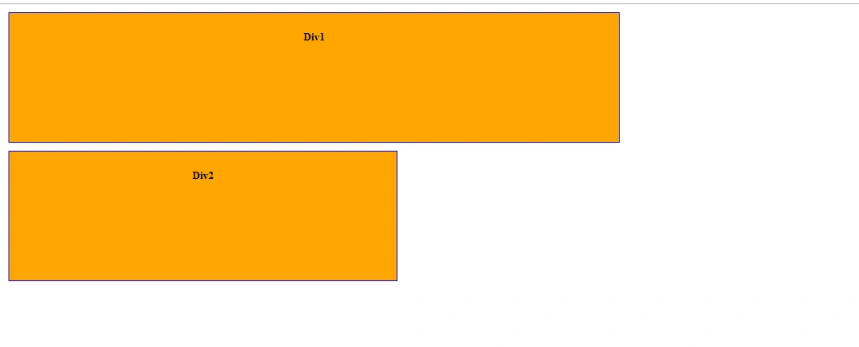
We can resize the div according to our requirement.
Summary
In this article we we learned about the jQuery UI methods of draggable, resizable and sortable. Jquery UI plugin is very effective for making a user interface interactive.
Join the conversation! Your thoughts help the community grow.