

Introduction
In this article I describe Check Constraints on a table, how to add a Check Constraint to a table, how to remove a Check Constraint from a table, and the limitations of a Check Constraint. Before explaining Check Constraints it is necessary to first explain what Domain Integrity is.
Domain Integrity
Domain Integrity ensures that values are valid for columns and prevents invalid values for columns within a database.
Check Constraint
A Check Constraint is a rule that identifies valid values for columns of data. A Check Constraint helps to enforce Domain Integrity. If the condition in a Check Constraint is not satisfied then it prevents the value from entering into the database.
Syntax
CREATE TABLE tableName (
    Column1 dataType CHECK (expression),
    Column2 dataType,
    ColumnN dataType
);
Example
CREATE TABLE emp (
    empId INT CHECK (empId > 10),
    empName VARCHAR(15)
);
Output
If we want to insert a record with less than 10 IDs then it shows the error.
INSERT INTO emp (empId, empName)
VALUES (8, 'd');
Output

Dropping the Check Constraint
First of all, we can determine the name of the constraint using the following command.
EXEC sp_help emp;Output
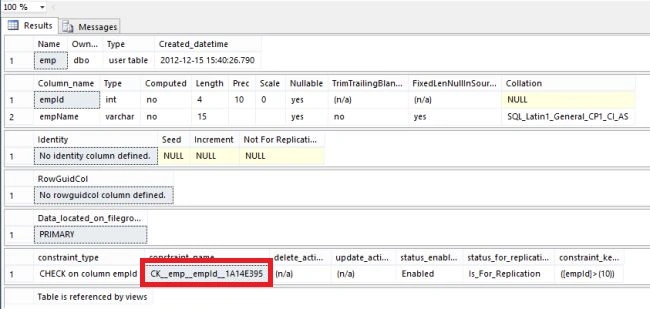
Now execute the following command.
ALTER TABLE emp
DROP CONSTRAINT CK__emp__empId__1A14E395;
Output
Adding the Check Constraint
ALTER TABLE emp
ADD CHECK (empId > 15);
Output
Limitation
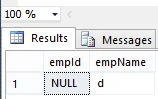
The Check Constraint rejects the values that are invalid or we can say which does not satisfy the Check Conditions. But in the case of a null, a Check Constraint will allow it to be insert into the database.
Insertion of Null value
INSERT INTO emp
VALUES (NULL, 'd');
Output
Summary
In this article, I described a Check Constraint in SQL Server. I hope this article has helped you to understand this topic. Please share if you know more about this. Your feedback and constructive contributions are welcome.
Join the conversation! Your thoughts help the community grow.