

Introduction
Up to SQL Server 2008 R2, SQL Server supported two types of storage, B-tree and Heap. The data in any table without an index is stored in the Heap, while the data of any table with indexes (either clustered or non-clustered) was stored in the B-tree structure. But B-tree and Heap store the data by rows.
SQL Server 2012 introduced a new feature called Column Store Indexes (CSIs) that stores the data in a column format. It stores and manages the data using column-based data storage and column-based query processing. Using a Column Store Index, we can get up to 10x query performance over row-oriented data storage and 7x data compression over the uncompressed data size.
The fundamental unit of storage in SQL Server is a "Page". The MDF file of the database is divided into many pages. Of couse Number of pages may increase when the data increases in the database. The page size in SQL Server is 8 KB. The extent made with 8 pages (contiguous pages) hence its size is 64 KB. The extent can either contain data belonging to one table or contain data belonging to multiple tables.
Benefits
Column store indexes work well with mostly read-only queries that do an analysis of large data sets. It gives a very high performance gain for the queries that use a full-table scan.
- Columns often have similar data as a result, it has high compression rates.
- Due to the high compression rates, it improves query performance.
- It uses a new query execution mechanism called "Batch-mode" execution and it is also known as vector-based or vectorized execution. It reduces CPU usage by a large amount.
Column Store Indexes use Microsoft VeriPaq (xVelocity) technology. It is an advanced storage and compression technology. A column store index stores each column in a separate page rather than storing multiple rows per pages.
In a row storage index, multiple pages contain multiple rows of columns spreading across multiple pages, while in a column storage index, multiple pages contain multiple occurances of a single column of data. This type of storage helps to improve query performance. Additionally if a column's data is redundant then that will help to further compress the data.
The following figure helps us to understand how the data stored in row storage and column storage.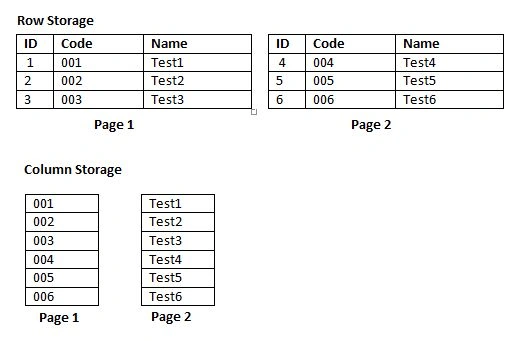
Creating a column storage index is very easy, just right-click on the index folder under table and select the "column storage index" option or just specify the keyword "COLUMNSTORE" in the Index creation query.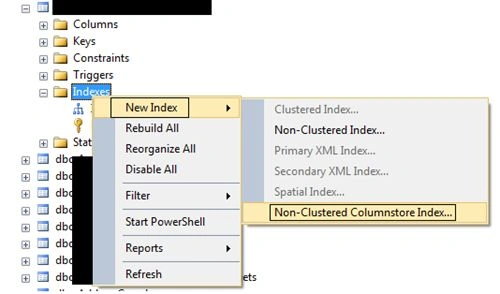
- CREATE NONCLUSTERED COLUMNSTORE INDEX [IX_Index_name] ON [dbo].[Table name] ([column Name] ASC)
- Once a column store index has been created on the table, it becomes read-only, in other words we cannot do insert, update and delete operations on it.
- Creation of a column storage index takes more time than a row storage index.
- A table can have only one column storage index.
- It does not support all data types, in other words we cannot create a column storage index on binary, varbinary, image, text, ntext, varchar (max), nvarchar (max) and so on.
- We cannot change the definition of a column store index, we need to drop and recreate the index.
- It cannot be created on an Indexed view.
- It cannot be created on a table that uses features like Change Tracking, Change Data Capture, Replication, Filestream and PAGE or ROW compression.
- A computed column and a sparse column cannot be part of a column store index.
- A column store index cannot be a filtered index.
- We cannot use ASC, DESC or INCLUDE keywords with the creation of a column store index.
Ignore Column storage Index Usage in Query
- Select column1, column2, column3, column4 from table1
- OPTION (IGNORE_NONCLUSTERED_COLUMNSTORE_INDEX)
Column Store Indexes are a new feature introduced with SQL Server 2012 that improve performance improvemetns of data warehousing queries. A Column Store Index comes with many limitations but when used with the right circumstances, it can significantly reduce disk I/O as well as utilize memory more efficiently.
Manish Kumar ChoudharyPosted Jan 8, 2015, 1:44 PM
Nice one..