

This article is easy to learn LINQ to XML Document.
Introduction
XML stands for EXtensible Markup Language. It's use to store and transport data. It is a textual data format with strong support via Unicode for different human languages.
It's developed by the W3C.
XML declaration
Defining the head of XML file:
- <?XML version="1.0" encoding="UTF-8"?>
XML Document -- XDocument,
XML Element --XElement,
XML Element Name --XName,
XML Element Attribute --XAttribute,
XML Node --XNode
- How to create XML Document.
- How to Perform CRUD Operation in XML Document.
Step 1: Firstly, I will create a XML document and save the document any location.
- <?xml version="1.0" encoding="utf-8"?>
- <Employess>
- <Employee>
- <id>101</id>
- <name>Surya</name>
- <salary>100000</salary>
- <email>[email protected]</email>
- <address>noida</address>
- </Employee>
- <Employee>
- <id>102</id>
- <name>Amit</name>
- <salary>12000</salary>
- <email>[email protected]</email>
- <address>Delhi</address>
- </Employee>
- <Employee>
- <id>120</id>
- <name>Surya</name>
- <salary>1500</salary>
- <email>Surya</email>
- <address>12222</address>
- </Employee>
- <Employee>
- <id>105</id>
- <name>Surya</name>
- <salary>150000</salary>
- <email>Surya</email>
- <address>12222</address>
- </Employee>
- <Employee>
- <id>105</id>
- <name>Amar</name>
- <salary>4522</salary>
- <email>[email protected]</email>
- <address>Noida</address>
- </Employee>
- <Employee>
- <id>103</id>
- <name>Surya</name>
- <salary>12000</salary>
- <email>[email protected]</email>
- <address>new delhi</address>
- </Employee>
- </Employess>
- Open the Visual studio and create an empty web application.
- Add a webform.
- Add some web controls like Gridview(Using show XML data), Textbox, Button.
- Add Namespace using System.XML.LINQ;
Like:
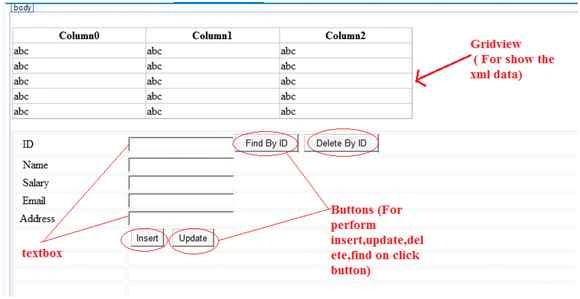
Step 3: Bind the XML data in GridView.
Firstly, add namesapace System.XML.LINQ;
Source Code:
- //Bind the Grid
- XDocument xmldoc;
- public void BindGrid()
- {
- xmldoc = XDocument.Load("D:/Emp12.xml"); //add xml document
- var bind = xmldoc.Descendants("Employee").Select(p => new
- {
- Id=p.Element("id").Value,
- Name=p.Element("name").Value,
- Salary=p.Element("salary").Value,
- Email=p.Element("email").Value,
- Address=p.Element("address").Value
- }).OrderBy(p=>p.Id);
- GridView1.DataSource = bind;
- GridView1.DataBind();
- }
- protected void Page_Load(object sender, EventArgs e)
- {
- BindGrid();
- }
- Code For Insert Data in XML documentfor reset():
- protected void Insert_Click(object sender, EventArgs e)
- {
- XElement emp = new XElement("Employee",
- new XElement("id", txtid.Text),
- new XElement("name", txtname.Text),
- new XElement("salary",txtsalary.Text),
- new XElement("email",txtemail.Text),
- new XElement("address", txtaddress.Text));
- xmldoc.Root.Add(emp);
- xmldoc.Save("D:/Emp12.xml");
- BindGrid();
- Reset(); // For clear textbox
- }
- private void Reset()
- {
- txtid.Text = "";
- txtname.Text = "";
- txtsalary.Text = "";
- txtaddress.Text = "";
- txtemail.Text = "";
- txtid.Focus();
- }
- Code For Find Data by Id in XML document
- protected void Find(object sender, EventArgs e)
- {
- XElement emp = xmldoc.Descendants("Employee").FirstOrDefault(p => p.Element("id").Value == txtid.Text);
- if (emp != null)
- {
- txtname.Text = emp.Element("name").Value;
- txtsalary.Text = emp.Element("salary").Value;
- txtemail.Text = emp.Element("email").Value;
- txtaddress.Text = emp.Element("address").Value;
- }
- }
- Code For Update by Id in XML document
- protected void Update_click(object sender, EventArgs e)
- {
- XElement emp = xmldoc.Descendants("Employee").FirstOrDefault(p => p.Element("id").Value == txtid.Text);
- if (emp != null)
- {
- emp.Element("name").Value = txtname.Text;
- emp.Element("salary").Value = txtsalary.Text;
- emp.Element("email").Value = txtemail.Text;
- emp.Element("address").Value = txtaddress.Text;
- xmldoc.Root.Add(emp);
- xmldoc.Save("D:/Emp12.xml");
- BindGrid();
- Reset();
- }
- }
- Code For Delete by Id in XML document
- protected void delete_click(object sender, EventArgs e)
- {
- XElement emp = xmldoc.Descendants("Employee").FirstOrDefault(p => p.Element("id").Value == txtid.Text);
- if (emp != null)
- {
- emp.Remove();
- xmldoc.Save("D:/Emp12.xml");
- BindGrid();
- Reset();
- }
- }
Important Question:
Difference between XElement and XDocument?
Answer: xDcument represent a whole XML Document.
xElement represent an XML element. It's part of longer document.
Hope this article helps you. Thanks for reading.
guy techPosted Jun 12, 2023, 3:47 AM
Hi all, pls remove line code xmldoc.Root.Add(emp); at update method above so that it update correct
guy techPosted Jun 12, 2023, 3:42 AM
Hi, your update method above not working correct, so it insert new XElement same Id into xml file. How to fix it?
anupam kumarPosted Oct 27, 2019, 1:43 PM
{"The ':' character, hexadecimal value 0x3A, cannot be included in a name."} error found when find by Id
SubashPosted Sep 15, 2016, 4:45 AM
Nice one
Sonu ChaudharyPosted May 26, 2016, 10:33 AM
good one
Bhuvanesh MohankumarPosted May 6, 2016, 3:56 PM
Good one...
Surya Pratap SinghPosted Sep 24, 2015, 11:57 AM
Thanks yr..
Akram bhatPosted Sep 24, 2015, 11:03 AM
keep it up :)
Piyush DixitPosted Sep 24, 2015, 10:48 AM
very nice
Santhakumar MunuswamyPosted Sep 22, 2015, 3:11 PM
Nice Article. Thanks for sharing
Surya Pratap SinghPosted Sep 22, 2015, 11:39 AM
thanks bro..
DHEERENDRA SINGHPosted Sep 22, 2015, 6:59 AM
nice...
Humayun Kabir MamunPosted Sep 22, 2015, 3:09 AM
Nice...
Karthikeyan KPosted Sep 21, 2015, 11:43 PM
Good one...Thanks for sharing
Surya Pratap SinghPosted Sep 21, 2015, 12:31 PM
thanks sir..
RakeshPosted Sep 21, 2015, 10:19 AM
Good share
Ankit KumarPosted Sep 21, 2015, 8:34 AM
gud one..
Surya pratap SinghPosted Sep 21, 2015, 6:55 AM
Nice..
Ajeet MishraPosted Sep 21, 2015, 6:53 AM
nice
Ankit BansalPosted Sep 21, 2015, 6:15 AM
good one...
Sumit JoshiPosted Sep 21, 2015, 3:27 AM
Thanks for sharing.
Sibeesh VenuPosted Sep 21, 2015, 3:23 AM
Nice Share :)
Saumya SinghPosted Sep 21, 2015, 3:17 AM
thanks for sharing...
Saumya SinghPosted Sep 21, 2015, 3:16 AM
good is...........