

As I promised, in this article, I shall explain the Entity Framework Core with SQLite in Docker. The architecture which I have used in Part I is based on Microservices architecture with docker or containerized apps. The power of Microservices architecture is the scalability, as you see in our Part I example. You can very quickly scale out your services by creating more product containers. In this part (SQLite), we will put the database inside the container. The first question coming in my mind is how can you scale out your services or application in a Docker container? So, you have to think about that before using SQLite inside the container.
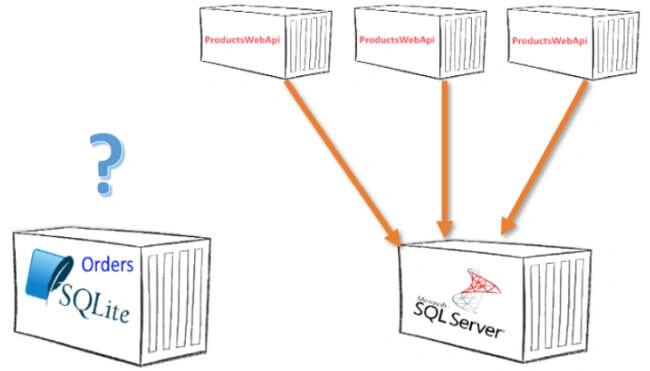
Image -1- shows ProductsWebAPI for easy scaling in/out with SQL Server
If you have not installed Docker, then please go back to Part I and install Docker for Windows desktop.
Source Code in GitHub: Source Code
For more information about Entity Framework Core and C# 8, please visit: bassam or Bassam on C#Corner
OrdersWebApi: Let us do it together (step by step)
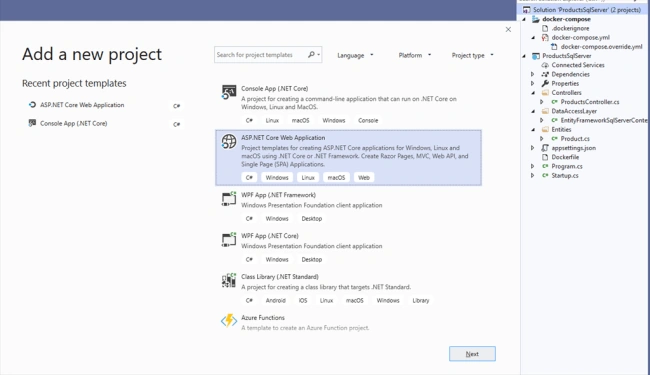
I have opened the solution file from Part I, and then I have selected from the menu item - "Add-> New Project…" and I have chosen ASP.NET Core Web Application, as you can see in the image below.
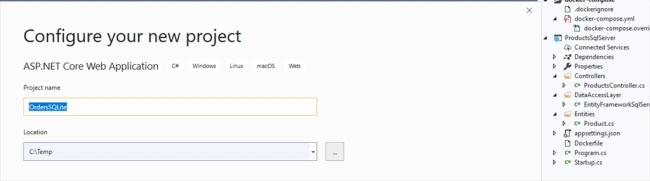
Here, I have set the project name to "OrdersSQLite”.
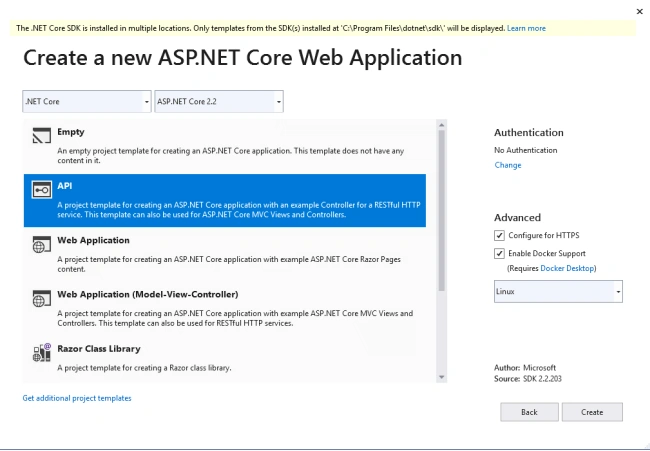
The next window is new. It came with the latest Visual Studio 2019 Update 3. I have selected “API” and then pressed “Create”.
A dummy OrdersSQLite project is generated and if you press F5, then you shall see the dummy value1 and value2 in your web browser.
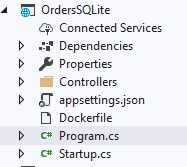
Domain Model and Data Access Layer
In this section, I have -
- added the entity “Order” to the project.
- added OrdersDBContext to the project and set up the connection string.
- added OrderssController to the project with some logic to handle the requests.
Order Entity
- public class Order
- {
- /// <summary>
- /// Gets or sets the order identifier.
- /// </summary>
- /// <value>The order identifier.</value>
- public int OrderId { get; set; }
- /// <summary>
- /// Gets or sets the name.
- /// </summary>
- /// <value>The name.</value>
- public string Name { get; set; }
- /// <summary>
- /// Gets or sets the product Ids.
- /// </summary>
- /// <value>The product Ids.</value>
- Collection<int> ProductIds { get; set; } = new Collection<int>();
- }
- public class OrderDbContext : DbContext
- {
- /// <summary>
- /// Gets or sets the orders.
- /// </summary>
- /// <value>The orders.</value>
- public DbSet<Order> Orders { get; set; }
- /// <summary>
- /// Initializes a new instance of the <see cref="OrderDbContext"/> class.
- /// </summary>
- /// <param name="options">The options.</param>
- public OrderDbContext(DbContextOptions<OrderDbContext> options)
- : base(options)
- {
- }
- protected override void OnModelCreating(ModelBuilder modelBuilder)
- {
- modelBuilder.Entity<Order>().HasData
- (
- new Order { OrderId = 1, Name = "MSDN Order" },
- new Order { OrderId = 2, Name = "Docker Order" },
- new Order { OrderId = 3, Name = "EFCore Order" }
- );
- }
- }
Also, I have added the connection string to the appsettings.json file.
- {
- "Logging": {
- "LogLevel": {
- "Default": "Warning"
- }
- },
- "AllowedHosts": "*",
- "ConnectionStrings": {
- "OrdersConnectionSqlite": "Filename=Orders.db;"
- }
- }
- [ApiController, Route("api/[controller]")]
- public class OrdersController : ControllerBase
- {
- /// <summary>
- /// The orders database context
- /// </summary>
- private readonly OrderDbContext _ordersDbContext;
- /// <summary>
- /// Initializes a new instance of the <see cref="OrdersController"/> class.
- /// </summary>
- /// <param name="ordersDbContext">The orders database context.</param>
- public OrdersController(OrderDbContext ordersDbContext)
- {
- this._ordersDbContext = ordersDbContext;
- }
- //GET: api/Orders
- /// <summary>
- /// Gets the order.
- /// </summary>
- /// <returns>Task<ActionResult<IEnumerable<Order>>>.</returns>
- [HttpGet]
- public async Task<ActionResult<IEnumerable<Order>>> GetOrder()
- {
- return Ok(await _ordersDbContext.Orders.ToListAsync());
- }
- // GET: api/Orders/5
- /// <summary>
- /// Gets the order.
- /// </summary>
- /// <param name="id">The identifier.</param>
- /// <returns>Task<ActionResult<Order>>.</returns>
- [HttpGet("{id}")]
- public async Task<ActionResult<Order>> GetOrder(int id)
- {
- var order = await _ordersDbContext.Orders.FindAsync(id);
- if (order == null)
- {
- return NotFound();
- }
- return Ok(order);
- }
- // PUT: api/Orders/5
- /// <summary>
- /// Puts the order.
- /// </summary>
- /// <param name="id">The identifier.</param>
- /// <param name="order">The order.</param>
- /// <returns>Task<IActionResult>.</returns>
- [HttpPut("{id}")]
- public async Task<IActionResult> PutOrder(int id, Order order)
- {
- if (id != order.OrderId)
- {
- return BadRequest();
- }
- _ordersDbContext.Entry(order).State = EntityState.Modified;
- try
- {
- await _ordersDbContext.SaveChangesAsync();
- }
- catch (DbUpdateConcurrencyException)
- {
- if (!IsOrderExists(id))
- {
- return NotFound();
- }
- throw;
- }
- return NoContent();
- }
- // POST: api/Orders
- /// <summary>
- /// Posts the order.
- /// </summary>
- /// <param name="order">The order.</param>
- /// <returns>Task<ActionResult<Order>>.</returns>
- [HttpPost]
- public async Task<ActionResult<Order>> PostOrder(Order order)
- {
- _ordersDbContext.Orders.Add(order);
- await _ordersDbContext.SaveChangesAsync();
- return CreatedAtAction("GetOrder", new { id = order.OrderId }, order);
- }
- // DELETE: api/Orders/5
- /// <summary>
- /// Deletes the order.
- /// </summary>
- /// <param name="id">The identifier.</param>
- /// <returns>Task<ActionResult<Order>>.</returns>
- [HttpDelete("{id}")]
- public async Task<ActionResult<Order>> DeleteOrder(int id)
- {
- var order = await _ordersDbContext.Orders.FindAsync(id);
- if (order == null)
- {
- return NotFound();
- }
- _ordersDbContext.Orders.Remove(order);
- await _ordersDbContext.SaveChangesAsync();
- return Ok(order);
- }
- /// <summary>
- /// Determines whether [is order exists] [the specified identifier].
- /// </summary>
- /// <param name="id">The identifier.</param>
- /// <returns><c>true</c> if [is order exists] [the specified identifier]; otherwise, <c>false</c>.</returns>
- private bool IsOrderExists(int id)
- {
- return _ordersDbContext.Orders.Any(e => e.OrderId == id);
- }
- }
- public class Startup
- {
- public Startup(IConfiguration configuration)
- {
- Configuration = configuration;
- }
- public IConfiguration Configuration { get; }
- // This method gets called by the runtime. Use this method to add services to the container.
- public void ConfigureServices(IServiceCollection services)
- {
- services.AddMvc().SetCompatibilityVersion(CompatibilityVersion.Version_2_2);
- services.AddDbContext<OrderDbContext>(options =>
- options.UseSqlite(Configuration.GetConnectionString("OrdersConnectionSqlite")));
- }
- // This method gets called by the runtime. Use this method to configure the HTTP request pipeline.
- public void Configure(IApplicationBuilder app, IHostingEnvironment env)
- {
- if (env.IsDevelopment())
- {
- app.UseDeveloperExceptionPage();
- }
- app.UseMvc();
- }
- }
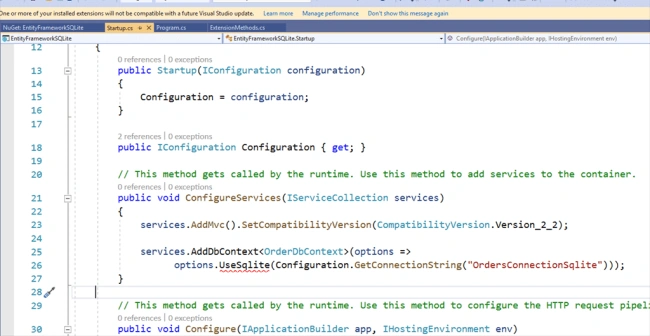
To solve the problem, we have to install Microsoft.EntityFrameworkCore.SQLite .
In the Package Manager Console, I have executed: “Install-Package Microsoft.EntityFrameworkCore.Sqlite”.
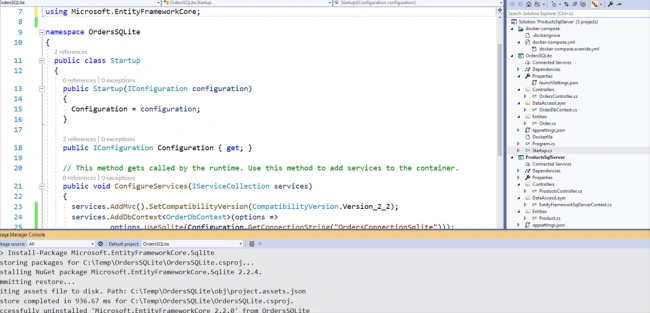
We have fixed the problem, and we can build and start the project; however before we do that, we shall create and feed the database. In SQLite, we need to generate the migration files that are required to create the database from scratch.
I use here also the Package Manager Console to generate the migration files.
“Add-Migration InitialCreate -Project EntityFrameworkSQLite”
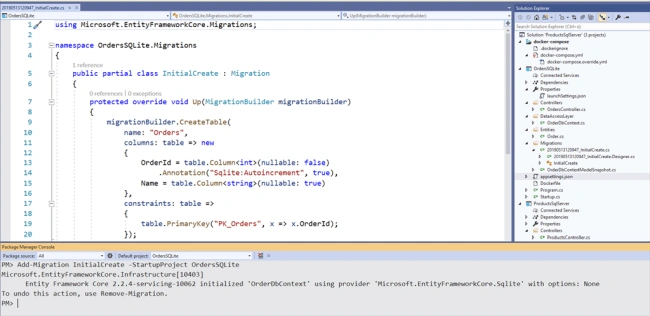
I have made an extension method “CreateDatabase”, which I use to create the database, as defined below.
- public static class ExtensionMethods
- {
- /// <summary>
- /// Migrates the database.
- /// </summary>
- /// <typeparam name="T"></typeparam>
- /// <param name="webHost">The web host.</param>
- /// <returns>IWebHost.</returns>
- public static IWebHost CreateDatabase<T>(this IWebHost webHost) where T : DbContext
- {
- using (var scope = webHost.Services.CreateScope())
- {
- var services = scope.ServiceProvider;
- try
- {
- var db = services.GetRequiredService<T>();
- db.Database.Migrate();
- }
- catch (Exception ex)
- {
- var logger = services.GetRequiredService<ILogger<Program>>();
- logger.LogError(ex, "Database Creation/Migrations failed!");
- }
- }
- return webHost;
- }
- }
- public class Program
- {
- public static void Main(string[] args)
- {
- CreateWebHostBuilder(args).Build().CreateDatabase<OrderDbContext>().Run();
- }
- public static IWebHostBuilder CreateWebHostBuilder(string[] args) =>
- WebHost.CreateDefaultBuilder(args)
- .UseStartup<Startup>();
- }
DockerFile
- FROM mcr.microsoft.com/dotnet/core/aspnet:2.2-stretch-slim AS base
- WORKDIR /app
- EXPOSE 32034
- FROM mcr.microsoft.com/dotnet/core/sdk:2.2-stretch AS build
- WORKDIR /src
- COPY ["../OrdersSQLite/OrdersSQLite.csproj", "../OrdersSQLite/"]
- RUN dotnet restore "../OrdersSQLite/OrdersSQLite.csproj"
- COPY . .
- WORKDIR "/src/../OrdersSQLite"
- RUN dotnet build "OrdersSQLite.csproj" -c Release -o /app
- FROM build AS publish
- RUN dotnet publish "OrdersSQLite.csproj" -c Release -o /app
- FROM base AS final
- WORKDIR /app
- COPY --from=publish /app .
- ENTRYPOINT ["dotnet", "OrdersSQLite.dll"]
- version: '3.4'
- services:
- OrdersSQLite:
- image: ${DOCKER_REGISTRY}orderswebapi
- build:
- context: .
- dockerfile: ../OrdersSQLite/Dockerfile
- ProductsSqlServer:
- image: ${DOCKER_REGISTRY}productswebapi
- build:
- context: .
- dockerfile: ProductsSqlServer/Dockerfile
- links:
- - sqlserver
- sqlserver:
- image: microsoft/mssql-server-linux:2017-latest
- hostname: 'sqlserver'
- environment:
- ACCEPT_EULA: Y
- SA_PASSWORD: "BigPassw0rd"
- volumes:
- - ./data/mssql:/var/opt/mssql3
- ports:
- - '1433:1433'
- expose:
- - 1433
- - 1433
- version: '3.4'
- services:
- OrdersSQLite:
- environment:
- - ASPNETCORE_ENVIRONMENT=Development
- ports:
- - "32034:80"
- ProductsSqlServer:
- environment:
- - ASPNETCORE_ENVIRONMENT=Development
- ports:
- - "32033:80"

Let us add a new Order. I am using, here again, Postman (Part I).
You have to do it by yourself.
- http://localhost:32034/api/orders
- {"name": "3 Pack Order"}
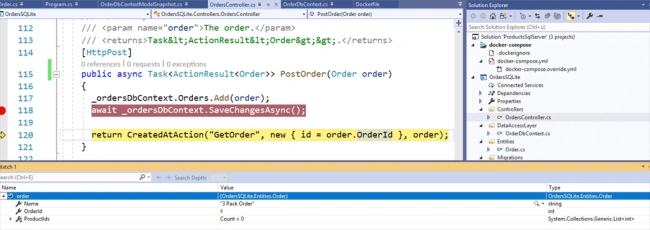
The job is done! We have a new order in the SQLite database.

How can you copy your database locally?
Open the command line console and execute the following command "docker container ls". ls stands for list containers.
As you saw, the order service has Container Id "f1b9f53be420". We will use the container id to copy the database file from the container to your computer.
Execute on the command line console,
- docker cp f1b9f53be420:/app/orders.db myLocalFilename.db
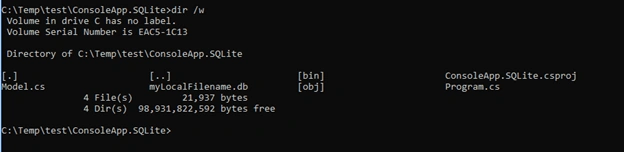
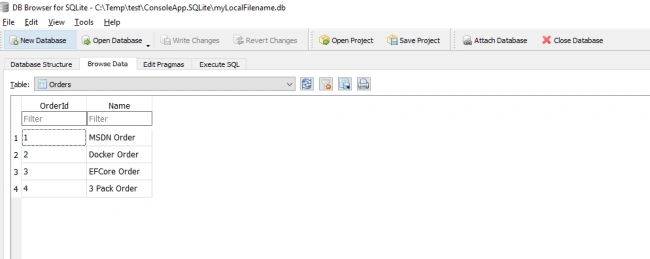
Let us open the copied database file and browse the database. I am using DB Browser SQLite (sqlitebrowser.org) to demonstrate the concept. Afterward, I am also going to show you, how can you generate the query information.
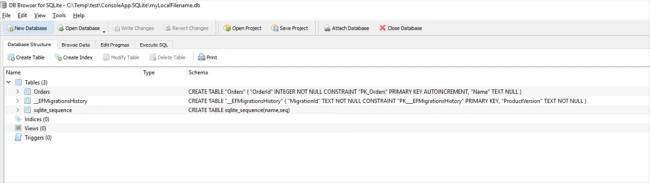
I have executed in DB Browser SQLite the following query,
- EXPLAIN QUERY PLAN SELECT * FROM Orders where OrderId = 2 AND name like '%Docker%'
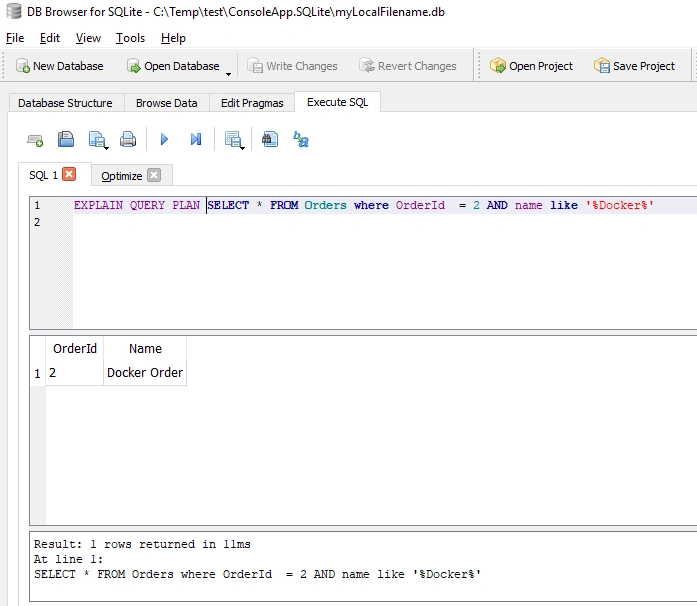
You can also browse the whole database.
Summary
You can easily use SQLite and Entity Framework Core in a Docker, but if you want to apply SQLite in the containerized apps, then you have to think about the core Microservices concept (Scalability). How can you scale out (Horizontal Scaling) your services?
Joginder BangerPosted May 6, 2020, 7:34 AM
Hi bro Thanks for userful article. I want the deploy docker image on windows server. can you tell me what is the procedure. thanks joginder