

Introduction
The MERGE statement can be used to insert, update, or delete data using the same transaction and avoid the need to create separate scripts for each operation. In this article, I present how to use the MERGE statement in a stored procedure to merge a single record and how to use it to merge a list of records by using Table-Valued parameters in SQL Server.
“Merge runs insert, update, or delete operations on a target table from the results of a join with a source table. For example, synchronize two tables by inserting, updating, or deleting rows in one table based on differences found in the other table.” (Microsoft Docs)
For demonstration purposes, I created three different MERGE procedures:
- A procedure to only upsert (insert or update) the data for a single record.
- A procedure to upsert the data for a list of records.
- A procedure to upsert and delete a list of records.
Person Table
For the next examples, I created a table of Persons, which contains an Id, Name, LastName, CreatedDate, and ModifiedDate columns:
CREATE TABLE Persons (
	Id INT NOT NULL,
	Name NVARCHAR(100) NULL,
	LastName NVARCHAR(255) NULL,
	CreatedDate DATETIME2 NOT NULL CONSTRAINT [DF_Persons_CreatedDate] DEFAULT GETUTCDATE(),
	ModifiedDate DATETIME2 NULL
	CONSTRAINT PK_Persons PRIMARY KEY(Id)
 );
This table will be used by the stored procedures that will be created next.
Merge Stored Procedure for upsert a single record
This first procedure will have as parameters an Id, a Name, and a LastName. Then, it will execute the MERGE statement, on which it will upsert a single record into the Persons table. It will have the following behavior:
- If the record with the specified primary key does not exist in the table, it will insert it.
- If the primary key already exists, it will update the record
MergePerson procedure
CREATE PROCEDURE dbo.MergePerson (
		@Id INT,
		@Name NVARCHAR(100),
		@LastName NVARCHAR(255)
	)
AS
BEGIN

	MERGE Persons as target
		USING (
				SELECT
					@Id as Id,
					@Name as Name,
					@LastName as LastName
			) AS source
			ON target.Id = source.Id

	WHEN NOT MATCHED BY target
		THEN
			INSERT (
				Id,
				Name,
				LastName
			)
			VALUES
			(
				@Id,
				@Name,
				@LastName
			)

	WHEN MATCHED
		THEN
			UPDATE SET
				Name = @Name,
				LastName = @LastName,
				ModifiedDate = GETUTCDATE()
	;

END- On lines 2 up to 4, there are three parameters: ID, Name, and LastName.
- On line 9, the MERGE statement starts, and it will use the parameters as the source, and the Persons table as target.
- On line 18, it will check if the source does not match the target, which means, if the Id value from the parameter does not exist in the Persons table yet, it will INSERT the record.
- On line 31, it will check if the source does match the target, which means if the Id value from the parameter already exists in the Person table, it will UPDATE the record.
Script to test the procedure
BEGIN TRANSACTION

	SELECT * FROM Persons;

	EXEC MergePerson @Id = 1, @Name = 'Frodo', @LastName = 'Baggins';
	EXEC MergePerson @Id = 2, @Name = 'Gandalf', @LastName = 'The Grey';
	EXEC MergePerson @Id = 3, @Name = 'Samwise', @LastName = 'Gamgee';

	SELECT * FROM Persons;

	WAITFOR DELAY '00:00:05';

	EXEC MergePerson @Id = 2 , @Name = 'Gandalf', @LastName = 'The White';

	SELECT * FROM Persons;

ROLLBACK- On line 3, a SELECT is executed to query the records from the Persons table before running the merge.
- On lines 5 up to 7, the procedure will be executed three times, and these data will be inserted into the Person table. It will create three persons: Frodo Baggins, Gandalf The Grey, and Samwise Gamgee.
- On line 9, a new SELECT to query the records from the Persons table is executed.
- On line 11, there is a delay instruction, to wait for 5 seconds before running the next scripts, this is done in order to see a different time in the ModifiedDate, otherwise, the time would be the same as the CreatedDate.
- On line 13, the procedure will be executed again, but now is expected an update operation, since Gandalf The Grey was updated to Gandalf the White (after fighting the Balrog).
- On line 15, a new SELECT to query the Person table is executed.
This is the result
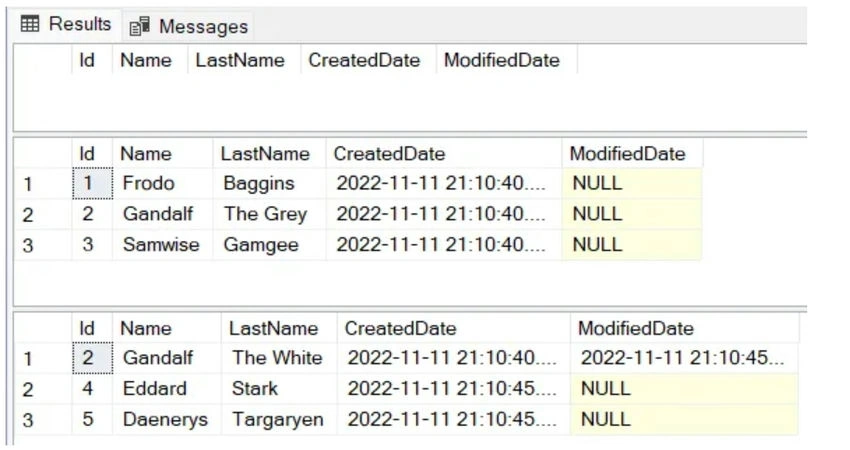
- As expected, in the first SELECT nothing was returned.
- On the second SELECT, which was executed after the MergePerson was executed three times, the records Frodo, Gandalf, and Samwise were returned.
- On the third SELECT, after the last execution of the MergePerson procedure, Gandalf The Grey was updated to Gandalf The White. Note that it kept the same CreateDate but included the date and time that the record was updated (ModifiedDate column).
Merge Stored Procedure for Upsert a list of Persons
Now think of a scenario where instead of upserting a single record, you will receive a list of persons, and the procedure should take care of multiple records instead of a single one.
In order to receive a list of persons as a parameter, we need to have a Table-Valued parameter. For that, we need to create a User-Defined Table Type (if you are not familiar with Table-Valued parameters, I recommend reading a previous article I wrote about this topic; you can read it by clicking here). This is the User-Defined Type Table that will be used as a parameter to the procedure:
CREATE TYPE PersonType AS TABLE (
	Id INT NOT NULL,
	Name NVARCHAR(100) NULL,
	LastName NVARCHAR(255) NULL,
	PRIMARY KEY(Id)
);
This procedure will have the following behavior: it will receive as a parameter a variable with the type PersonType(which is something similar to a list of persons), then it will execute the MERGE statement, on which it will upsert the records into the Person table. It will have a similar behavior as the previous procedure, but now, instead of considering a single record, it will consider a list of records. This is the procedure behavior:
- If the record with the specified primary key does not exist in the table, it will insert it.
- If the primary key already exists, it will update the record
This is the MergePersonsUpsert procedure
CREATE PROCEDURE dbo.MergePersonsUpsert (
		@Persons PersonType READONLY
	)
AS
BEGIN

	MERGE Persons as target
		USING (
			SELECT
				Id,
				Name,
				LastName
			FROM @Persons
			) AS source
		ON target.Id = source.Id

	WHEN NOT MATCHED THEN
	INSERT (
		Id,
		Name,
		LastName
	)
	VALUES
	(
		source.Id,
		source.Name,
		source.LastName
	)

	WHEN MATCHED THEN
		UPDATE SET
			Name = source.Name,
			LastName = source.LastName,
			ModifiedDate = GETUTCDATE()
	;

END- On line 2, there is the parameter @Persons of type PersonType.
- On line 7, the MERGE statement starts, and it will use the values from the parameter @Persons as source, and the Persons table as target.
- On line 17 up to 28, it will check if the source do not match the target, it will INSERT the record.
- On line 30 up to 34, it will check if the Source do match the Target, it will UPDATE the record.
Let’s now test this procedure
BEGIN TRANSACTION

	SELECT * FROM Persons;

	INSERT INTO Persons (Id, Name, LastName)
	VALUES (1, 'Frodo', 'Baggins'),
		   (2, 'Gandalf', 'The Grey'),
		   (3, 'Samwise', 'Gamgee');

	SELECT * FROM Persons;

	WAITFOR DELAY '00:00:05';

	DECLARE @Persons PersonType;

	INSERT INTO @Persons
	SELECT 4, 'Eddard ', 'Stark'
	UNION ALL
	SELECT 2, 'Gandalf', 'The White'
	UNION ALL
	SELECT 5, 'Daenerys', 'Targaryen';

	EXEC MergePersonsUpsert @Persons;

	SELECT * FROM Persons;

ROLLBACK- On line 3, a SELECT is executed to query the records from the Person table.
- On lines 5 up to 8, there is a manual INSERT operation to add the following records into the Person table: Frodo Baggins, Gandalf The Grey, and Samwise Gamgee.
- On line 10, a new SELECT to query the records from the Person table is executed.
- On line 12, there is a delay instruction, to wait for 5 seconds before running the next scripts, this is done in order to see a different time in the ModifiedDate, otherwise, the time would be the same as the CreatedDate.
- On line 14, the variable @Persons of type PersonType is declared.
- On lines 16 up to 21, three records are added into the @Persons variable: Eddard Stark, Gandalf the White, and Daenerys Targaryen.
- On line 13, the MergePersonsUpsert procedure is executed with the parameter @Persons.
- On line 25, a new SELECT to query the Person table is executed.
This is the result
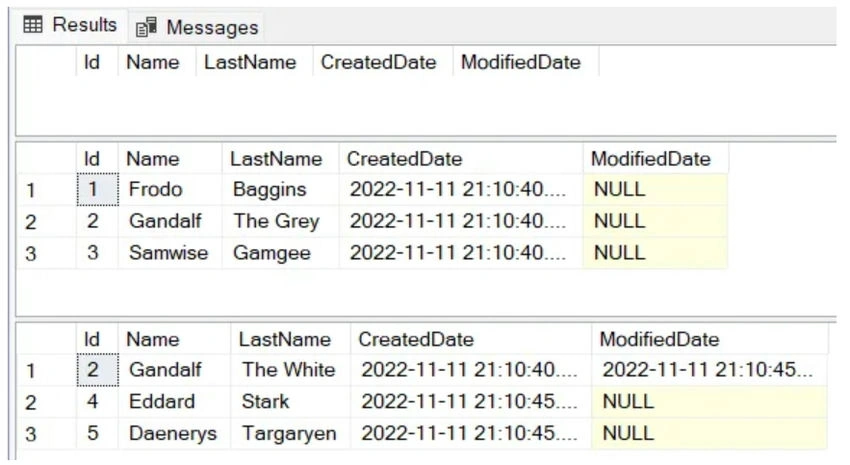
- As expected, nothing was returned in the first SELECT.
- In the second SELECT, after the manual INSERT script was executed, the records Frodo, Gandalf, and Samwise were returned.
- The third SELECT, after the procedure MergePersonsUpsert be executed, it was returned the records Frodo Baggins, Gandalf the White, Samwise Gamgge, Eddard Stark and Daenerys Targaryen.
What happened during the execution of the MergePersonsUpsert procedure
- Frodo Baggins and Samwise Gamgge already existed in the database, so nothing was changed for these two records. You can confirm that by checking the values in the CreatedDate column (which has the time of the creation of the records) and the ModifiedDate column is null - which means that the records were not updated).
- The record for Gandalf The Grey was updated to Gandalf the White, because the Primary Key Id 2 already existed in the database and also exists in the @Persons variable. You can confirm that by checking the values in the CreatedDate column and ModifiedDate columns, it kept the same CreateDate but included the date and time that the record was updated (ModifiedDate column).
- The records Eddard Stark and Daenerys Targaryen were added to the Person table because the Primary Key Ids 4 and 5 exist in the @Persons variable and did not exist in the Person table.
Merge Stored Procedure for Upsert and Delete a list of Person
Now, let’s include a new requirement for the new procedure: every time the procedure is executed, it’s not only necessary to upsert the records but also delete the records that are in the database but are not in the list of persons that were received as a parameter.
Think of a scenario where your application receives some data from some other application, and you need to override all the data in your database every time the procedure is executed. Perhaps you are thinking that instead of implementing a merge for that, we could only delete all the records and insert them again, this would work of course, but the indexes of the table will be messed up, so to avoid this situation, let’s use the merge statement.
The procedure will receive as a parameter a variable of type PersonType(think of that as something similar to a list of persons), then it will execute the MERGE statement, on which it will upsert or delete records into the Person table. It will have the following behavior:
- If the record from the @Persons parameter contains a primary key that does not exist in the table in the database, it will insert the record.
- If the record from the @Persons parameter contains a primary key that already exists in the table in the database, it will update the record.
- If a record exists in the database but does not exist in the @Persons variable, it will delete the existent record in the database.
For this example, I’m going to make use of a temporary table inside the procedure. This is not mandatory, but in case you know that you will receive a big amount of data, this is something that you should consider using because it will improve the performance of the procedure.
This is the MergePersonsWithDelete procedure
CREATE PROCEDURE dbo.MergePersonsWithDelete (
		@Persons PersonType READONLY
	)
AS
BEGIN

	 IF OBJECT_ID('#PersonsTemp') IS NOT NULL
		DROP TABLE #PersonsTemp

	 CREATE TABLE #PersonsTemp
	 (
		Id INT NOT NULL,
		Name NVARCHAR(100) NULL,
		LastName NVARCHAR(255) NULL,
		PRIMARY KEY (Id)
	 );

	INSERT INTO #PersonsTemp
	SELECT *
	FROM @Persons

	MERGE Persons as target
		USING (
			SELECT
				Id,
				Name,
				LastName
			FROM #PersonsTemp
			) AS source
		ON target.Id = source.Id

	WHEN NOT MATCHED THEN
	INSERT (
		Id,
		Name,
		LastName
	)
	VALUES
	(
		source.Id,
		source.Name,
		source.LastName
	)

	WHEN MATCHED THEN
		UPDATE SET
			Name = source.Name,
			LastName = source.LastName,
			ModifiedDate = GETUTCDATE()

	WHEN NOT MATCHED BY SOURCE
	THEN
		DELETE
	;

END- On line 2, there is the parameter @Persons of type PersonType.
- On lines 7 and 8, there is a validation to drop the temporary table (“PersonsTemp”) when it is not null.
- On lines 10 up to 16, the temporary table #PersonsTemp is created.
- On lines 18 up to 20, the values from the parameter @Persons are inserted into the temporary table #PersonsTemp.
- On lines 22 up to 30, the MERGE statement starts, and it will use the temporary table #PersonsTemp as the source and the Person table as a target.
- On lines 32 up to 43, it will check if the source do not match the target, it will INSERT the record.
- On lines 45 up to 49, it will check if the source do match the target, it will UPDATE the record.
- On lines 51 up to 53, it will check if the target do not match the source, which means, if the person exists in the database, but does not exist in the #PersonsTemp table (which values come from the@Persons variable from the parameter), it will delete the record in the database.
[Extra] It’s also possible to include conditions in the merge statement. For instance, using the example of this procedure, let’s say that we never want to delete the record with the primary key 1, even when this record exists in the database but does not exist in the list of persons that were sent to the procedure. In this case, before the DELETE operation, it’s possible to include the “AND target.Id <> 1”:
WHEN NOT MATCHED BY SOURCE AND target.Id <> 1
 THEN
  DELETE
 ;
This means that when target do not match the source AND the target Id is different than 1, then it will delete the record, otherwise will not delete it. We will not use this in this procedure since we want to delete everything, but it’s good to know that it’s possible to do it when necessary.
Let’s now test this procedure
- On line 3, the records for persons (before running the merge) will be returned.
- On line 5, there is an INSERT to add some data into the Persons folder. It will create three persons: Frodo Baggins, Gandalf The Grey, and Samwise Gamgee.
- On line 10, a new SELECT to query the persons is executed.
- On line 12, there is a delay instruction, to wait for 5 seconds before running the next scripts, this is done in order to see a different time in the ModifiedDate, otherwise the time would be the same as the CreatedDate.
- On line 14, the variable @Persons of type PersonType is declared.
- On lines 16 up to 21, there is the INSERT to the table type variable. It will be added three values: Eddard Stark, Gandalf the White and Daenerys Targaryen.
- On line 24, the merge script is executed.
- On line 26, a new SELECT to query the persons is executed.
This is the result
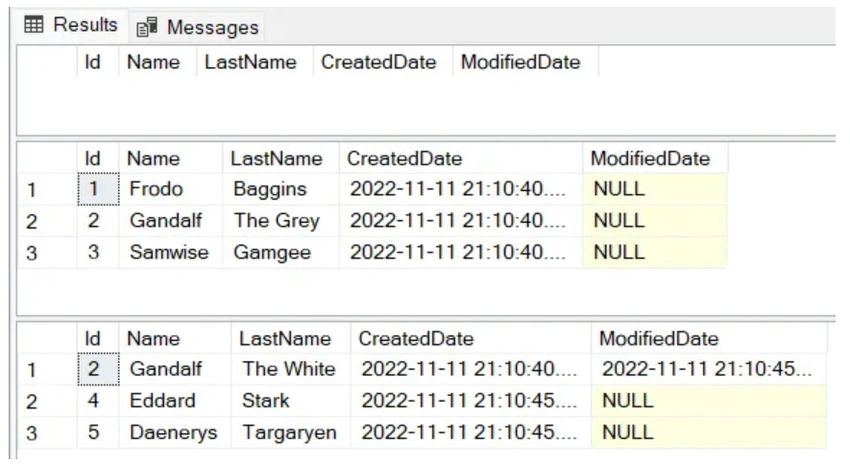
- As expected, nothing was returned in the first SELECT.
- In the second SELECT, after the manual INSERT was executed, the records Frodo, Gandalf, and Samwise were returned.
- The third SELECT, after the procedure MergePersonsWithDelete be executed, it was returned the records Gandalf the White, Eddard Startk and Daenerys Targaryen.
What happened during the execution of the MergePersonsWithDelete procedure?
- Frodo and Samwise were deleted from the database because the Primary Keys Id 1 and Id 3 were not on the @Persons variable that was sent to the procedure
- The record for Gandalf The Grey was updated to Gandalf the White because the Primary Key Id 2 already existed in the database, and it also existed in the @Persons variable (note that similar to the previous procedure, it kept the same CreateDate but included the date and time that the record was updated (ModifiedDate column).
- The records Eddard Stark and Daenerys Targaryen were added to the Person table because the Primary Key Ids 4 and 5 exist in the @Persons variable and did not exist in the Person table in the database.
Conclusion
The MERGE statement is useful when you need to have a procedure that can handle insert and update (upsert) or delete operations in the same transaction without creating separate procedures for each operation. It’s possible to use MERGE for merging a single record, or for merging a list of records.
Join the conversation! Your thoughts help the community grow.