

In this walkthrough, you will learn how to send/share the data and get answers to the following questions.
- What is @Input?
- What is @Output?
- Send data from Parent to Child Component
What is @Input?
@Input decorator is used to define an input property for a component and pass data from the parent component to the child component.
What is @Output?
@Output decorator is used to share the data from the child component to the parent component.
Send Data from Parent to Child Component
Create an Angular Project called “AnguWalk” using the following CLI command.
Command
ng new AnguWalkExample
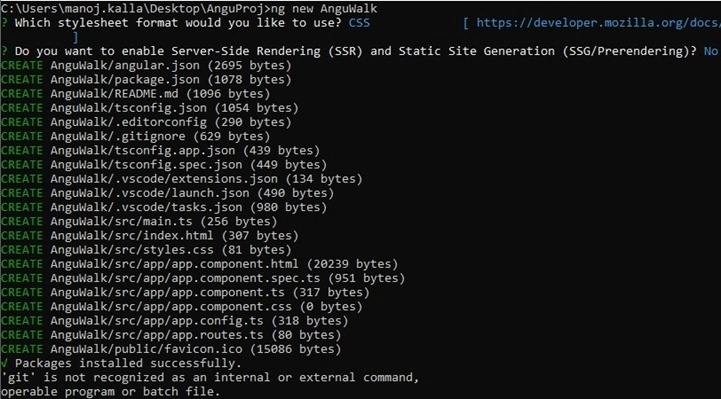
Move the cursor to inside the project folder and open Visual Studio code.
Command
cd anguwalk
code .
Example

Note. Visual studio code will get started only if your system is configured with path and settings.
Open the following file and Update the code.
App.component.ts file code
import { Component, NgModule, OnInit } from '@angular/core';
import { FormsModule } from '@angular/forms';
import { CommonModule } from '@angular/common';
import { RouterOutlet } from '@angular/router';
import { VerifydetailComponent } from './verifydetail/verifydetail.component';

declare function HelloMsg(arg: any): void;
@Component({
  selector: 'app-root',
  standalone: true,
  imports: [RouterOutlet, FormsModule, CommonModule, VerifydetailComponent],
  templateUrl: './app.component.html',
  styleUrls: ['./app.component.css']
})
export class AppComponent {
  FullnameObj!: string;

  formpro(form: any) {
    this.FullnameObj = form.txtFullname;
    console.log(form);
    console.log(this.FullnameObj);
  }
}
App.component.html file code
<router-outlet></router-outlet>

<form #contForm="ngForm" (ngSubmit)="formpro(contForm.value)">
  <table>
    <tr>
      <td>Fullname</td>
      <td>
        <input type="text" id="txtFullname" style="font-size: xx-large;" name="txtFullname" ngModel #txtFullname="ngModel">
      </td>
    </tr>
    <tr>
      <td>Mobile</td>
      <td>
        <input type="text" id="txtMobile" style="font-size: xx-large;" name="txtMobile" ngModel #txtMobile="ngModel">
      </td>
    </tr>
    <tr>
      <td>Email ID</td>
      <td>
        <input type="email" id="txtemailid" style="font-size: xx-large;" name="txtemailid" ngModel #txtemailid="ngModel">
      </td>
    </tr>
    <tr>
      <td colspan="2">
        <button type="submit" style="font-size: xx-large;">Submit</button>
      </td>
    </tr>
  </table>
</form>

<!-- fullval is INPUT variable and assigning the value of fullnameobj. -->
<app-verifydetail [fullval]="FullnameObj"></app-verifydetail>
Create a child component named “verifydetail” where we are going to receive fullval value.
Command
ng g c verifydetail
verifydetail.component.ts file code
import { Component, Input } from '@angular/core';

@Component({
  selector: 'app-verifydetail',
  standalone: true,
  imports: [],
  templateUrl: './verifydetail.component.html',
  styleUrls: ['./verifydetail.component.css']
})
export class VerifydetailComponent {
  // To receive the value from parent component.
  @Input() fullval: string = "";
}
verifydetail.component.html file code
<p>verifydetail works!</p>
<h1>Welcome {{ fullval }}</h1>
Output
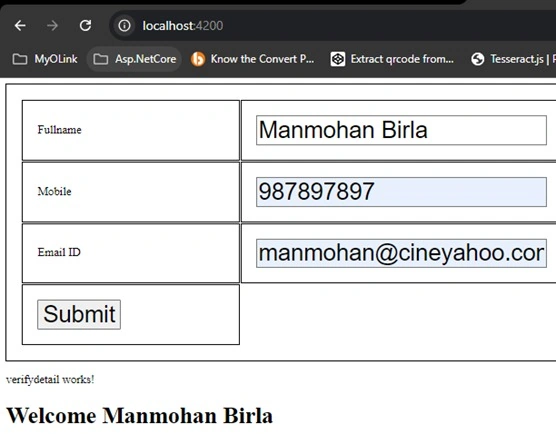
In the above output, the screenshot full name text box value "Manmohan Birla" is passed to the child component.
Next article you will learn how to send data from the child component to the parent component.
Happy Coding...
Join the conversation! Your thoughts help the community grow.