

This article will demonstrate the logical built-in IIF function introduced in SQL Server 2012. The IIF function in SQL Server is a logical function that returns one of two values based on the evaluation of a Boolean expression. The IIF() function is used to test the if else condition. It takes 3 parameters. The first parameter is a boolean expression based on the first parameter. It will have the same result as the second and third parameters. If the boolean expression is true, then the second parameter returns true. If the boolean expression is false, the third parameter will return as false.
IIF() is the shorthand writing of a case statement in SQL Server. It supports 10 nested IIF().
Syntax of IIF()
IIF(boolean_expression, true_value, false_value)boolean_expression
The first parameter is a boolean expression. Based on a boolean expression, evaluate and return the second and third parameter results.
true_value
IIF() returns true when a boolean expression evaluates to true.
false_value
IIF() returns a false value when a boolean expression evaluates to false.
It works similar to a case statement. Let's take Case statement syntax,
CASE
   WHEN boolean_expression
       THEN true_value
   ELSE
       false_value
END
Example of IIF() and Case statement: True result
Declare @marksObtained int = 60 , @cutofMarks int = 40
select case when @marksObtained > @cutofMarks then 'Pass' Else 'Fail' End as Result
select IIF(@marksObtained > @cutofMarks, 'Pass','Fail') as Result
Example of IIF() and Case statement: False result
Declare @marksObtained int = 35 , @cutofMarks int = 40
select case when @marksObtained > @cutofMarks then 'Pass' Else 'Fail' End as Result
select IIF(@marksObtained > @cutofMarks, 'Pass','Fail') as Result
We should be cautious while using NULL values with the IIF function. We can use only one NULL value in the 2nd or 3rd parameter. If you use both parameters as null, then it will throw an error.
SELECT IIF(100 > 99, Null, NULL) AS Result; 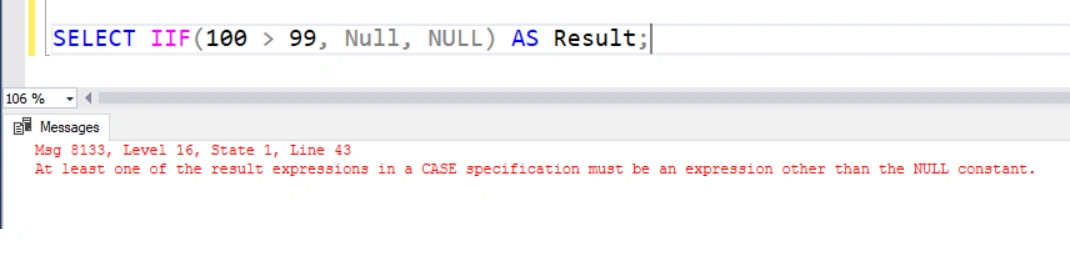
Let's try a NULL value with one parameter.
SELECT IIF(100 > 99, 'True', NULL) AS Result;
SELECT IIF(100 > 99, NULL, 'False') AS Result;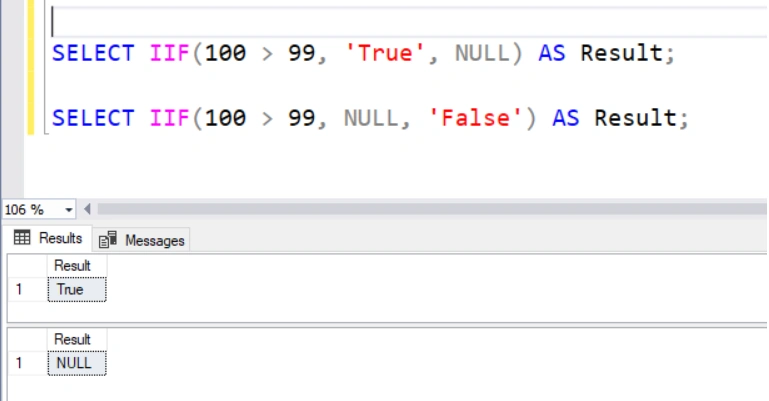
Let's use IIF() with real-time data with a table. Below is the script to create the Orders table,
Create table using below script,
Create Table Orders(
OrderId int identity(1,1),
CustomerId varchar(100),
OrderDate datetime,
OrderStatusId int,
TotalAmount decimal(18,2),
)
Insert records into the orders table using the below script.
insert into Orders (CustomerId,OrderDate,OrderStatusId,TotalAmount) values(1,GETDATE()-5,1,1000)
insert into Orders (CustomerId,OrderDate,OrderStatusId,TotalAmount) values(1,GETDATE()-4,2,2000)
insert into Orders (CustomerId,OrderDate,OrderStatusId,TotalAmount) values(1,GETDATE()-3,1,5000)
insert into Orders (CustomerId,OrderDate,OrderStatusId,TotalAmount) values(1,GETDATE()-10,3,1000)
insert into Orders (CustomerId,OrderDate,OrderStatusId,TotalAmount) values(1,GETDATE()-15,3,2000)
insert into Orders (CustomerId,OrderDate,OrderStatusId,TotalAmount) values(1,GETDATE()-15,3,700)
insert into Orders (CustomerId,OrderDate,OrderStatusId,TotalAmount) values(1,GETDATE()-15,1,600)
insert into Orders (CustomerId,OrderDate,OrderStatusId,TotalAmount) values(1,GETDATE()-15,2,600)
insert into Orders (CustomerId,OrderDate,OrderStatusId,TotalAmount) values(1,GETDATE()-15,4,600)
Nested IIF() function
SELECT
   IIF(OrderStatusId = 1, 'Waiting',
       IIF(OrderStatusId=2, 'InProgress',
           IIF(OrderStatusId=3, 'Rejected',
               IIF(OrderStatusId=4, 'Completed','NA')
           )
       )
   ) AS Status,
   COUNT(OrderStatusId) as totalcount
FROM Orders GROUP BY OrderStatusId ;
The result of the above query is as below,
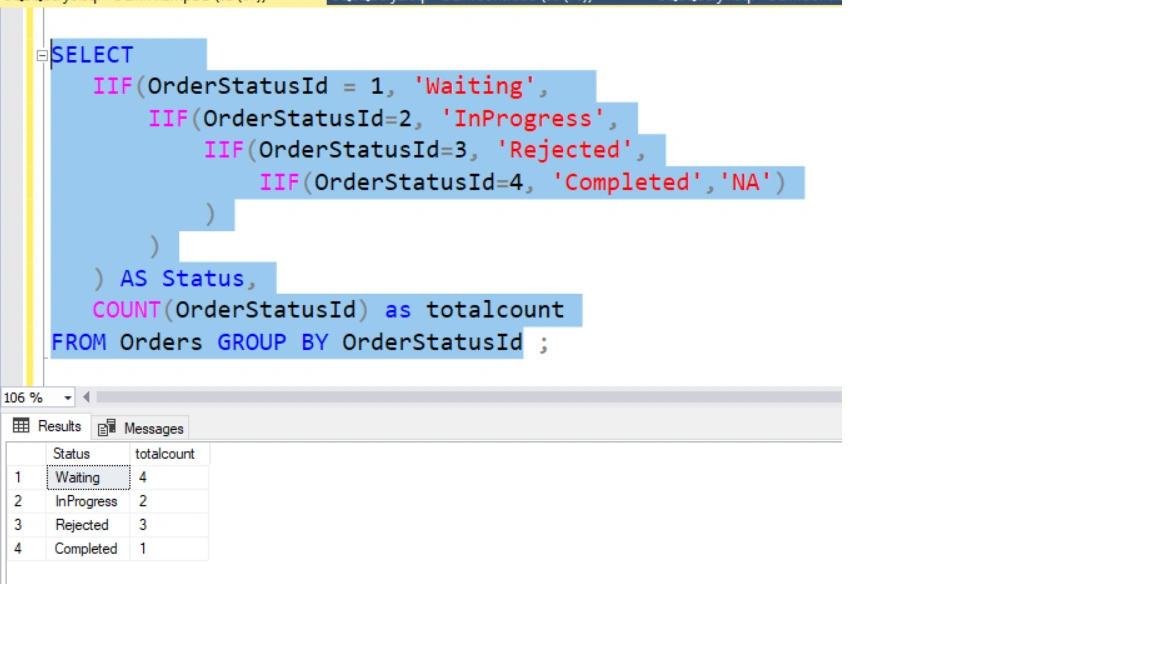
Use IIF() with the aggregate function to get the result in a single row.
SELECT
    SUM(IIF(OrderStatusId = 1, 1, 0)) AS 'Waiting',
    SUM(IIF(OrderStatusId = 2, 1, 0)) AS 'InProgress',
    SUM(IIF(OrderStatusId = 3, 1, 0)) AS 'Rejected',
    SUM(IIF(OrderStatusId = 4, 1, 0)) AS 'Completed',
    COUNT(*) AS Total
FROM  Orders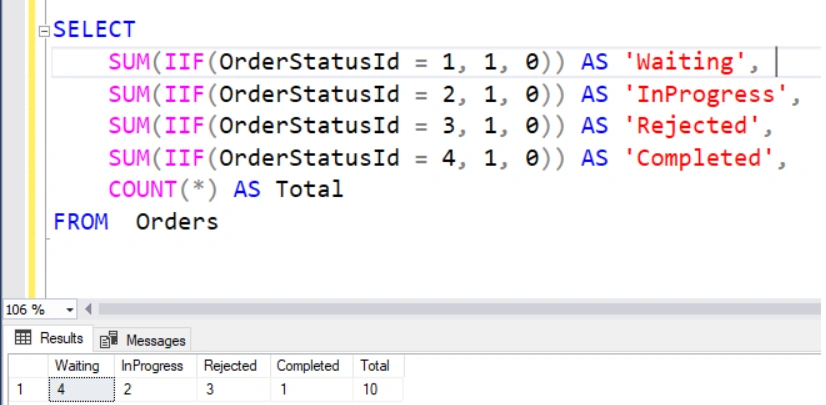
Summary
In this article, we have explored the SQL IIF(). The IIF statement is a shorthand way of writing a case statement-related condition. SQL Server 2012 and later versions include this built-in function. We have learned the IIF() in-built logical function, another short way to write a case statement in SQL Server.
Join the conversation! Your thoughts help the community grow.