

String Object Method In TypeScript: Part 3
Before reading this article, please go through the following articles:
Introduction
The String object is used to manage a series of characters. A String object contains complete information about a string. In TypeScript, String objects are created with "new String()".
In this article, I am describing the string object's Search method in TypeScript.
Search() Method
In TypeScript, the search() method is used to search a string for a specified value and it will return the position of the match. If no match is found then it will return -1.
Syntax
- string.search(searchvalue)
searchvalue: a required parameter; it the value to search for in a string.
Function
- Search() {
- var str = prompt("Please enter string");
- var searchstr = prompt("enter search string");
- var result = str.search(searchstr);
- var div = document.getElementById("content");
- div.style.color = "Blue";
- div.innerText = "Search Method \n String-> " + str + "\n search String-> " + searchstr + "\nPosition of the match-> " + result + "\n";;
- }
The following example shows how to use the search method in TypeScript. In this example, we get the string and search the string using "user.search()"; the method returns the position of the match.
Complete Program
Search.ts
- class Search_method {
- Search() {
- var str = prompt("Please enter string");
- var searchstr = prompt("enter search string");
- var result = str.search(searchstr);
- var div = document.getElementById("content");
- div.style.color = "Blue";
- div.innerText = "Search Method \n String-> " + str + "\n search String-> " + searchstr + "\nPosition of the match-> " + result + "\n";;
- }
- }
- window.onload = () => {
- var obj = new Search_method();
- obj.Search();
- };
Search_MethodDemo.htm
- <!DOCTYPE html>
- <html lang="en"
- xmlns="http://www.w3.org/1999/xhtml">
- <head>
- <meta charset="utf-8" />
- <title>TypeScript HTML App</title>
- <link rel="stylesheet" href="app.css" type="text/css" />
- <script src="Search.js"></script>
- </head>
- <body>
- <h3>search() String Object Method In TypeScript</h3>
- <div id="content"/>
- </body>
- </html>
Search.js
- var Search_method = (function() {
- function Search_method() {}
- Search_method.prototype.Search = function() {
- var str = prompt("Please enter string");
- var searchstr = prompt("enter search string");
- var result = str.search(searchstr);
- var div = document.getElementById("content");
- div.style.color = "Blue";
- div.innerText = "Search Method \n String-> " + str + "\n search String-> " + searchstr + "\nPosition of the match-> " + result + "\n";;
- };
- return Search_method;
- })();
- window.onload = function() {
- var obj = new Search_method();
- obj.Search();
- };
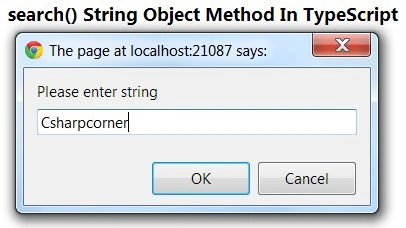
Output 1
Enter a string and click on "Ok":
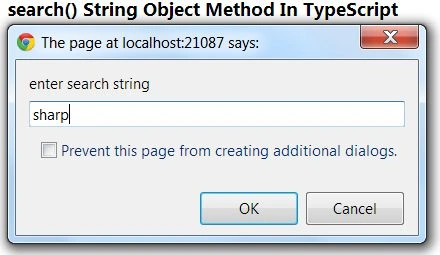
Output 2
Enter a search string:
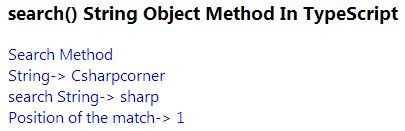
Output 3
Join the conversation! Your thoughts help the community grow.