
LINQ to XML Object Model
I would like to tell you that you have to know how to create a database application because Windows Phone does not support SQL Server any more. Therefore you must use either LINQ over XML or store the database somewhere on server/Windows and provide services so that the client can access and make a query to get and update data.
Professional developers can use LINQ to XML to greatly increase their productivity. With LINQ to XML, they can write less code that is more expressive, more compact, and more powerful. They can use query expressions from multiple data domains at the same time.
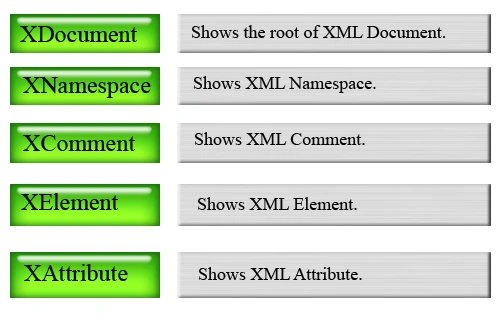
We have to use a System.Xml.Linq namespace for working with LINQ to XML and this namespace contains the following classes:
| Class | Description |
| XElement | Shows XML element. |
| XNamespace | Shows XML namespace. |
| XDocumentType | Shows XML document-type |
| XComment | Shows XML comment. |
| XDeclaration | Shows XML declaration. |
| Extensions | Contain LINQ to XML extension methods. |
| XNode | Shows abstract concept of a node. |
| XDocument | Shows XML document. |
| XNodeEqualityComparer | Compare nodes whether they are equal or not. |
| XName | Shows the name of an XML element |
| XCData | Shows text node which contain CData. |
| XNodeDocumentOrderComparer | Compare nodes for their document order. |
| XProcessingInstruction | Shows XML processing instruction. |
| XObjectChangeEventArgs | Provide Data for changed events. |
| XAttribute | Shows XML attribute. |
| XObject | Shows node or an attribute in an XML tree. |
| XText | Shows the text node. |
| XStreamingElement | Shows element for streaming output. |
| XContainer | Shows node that can contain other nodes. |
Let's start the Application
Here I am going to create a Windows Phone 7 application in which you see how to filter the XML data and display it in the Windows Phone application. I stored five cricketer's data into a XML file and on the basis of their names the filtered data will show on the screen.
- Create a new Windows Phone application.
- Open the MainPage.xaml file and create one TextBox two Button and Four TextBlocks inside the main grid.
<TextBox Height="72" HorizontalAlignment="Left" Background="White" Margin="174,92,0,0" Name="textBox1" VerticalAlignment="Top" Width="282" /><Button Content="Search" BorderThickness="0" Background="Silver" Height="65" HorizontalAlignment="Left" Margin="174,187,0,0" Name="button1" VerticalAlignment="Top" Width="140" Click="button1_Click" />
<Button Content="Reset" BorderThickness="0" Background="Silver" Height="66" HorizontalAlignment="Left" Margin="305,187,0,0" Name="button2" VerticalAlignment="Top" Width="151"
Click="button2_Click" /><TextBlock Height="58" HorizontalAlignment="Left" Margin="12,28,0,0" Name="textBlock1" Text="Welcome To The Indian Cricket's Cards" FontSize="23" FontWeight="Bold" Foreground="#AE09BD" VerticalAlignment="Top" Width="444" />
<TextBlock Height="56" HorizontalAlignment="Left" Margin="12,108,0,0" Name="textBlock2" Text="Player Name" FontSize="23" FontWeight="Bold" Foreground="#B5A1ED" VerticalAlignment="Top" Width="175" />
<TextBlock Height="44" HorizontalAlignment="Left" Margin="12,253,0,0" Name="textBlock3" Text="Please Enter The Player Name" FontSize="28" FontWeight="Bold" Foreground="Red" Visibility="Collapsed" VerticalAlignment="Top" Width="444" />
<TextBlock Height="47" HorizontalAlignment="Left" Margin="3,246,0,0" Name="textBlock4" Text="No Record Found" FontSize="28" FontWeight="Bold" Foreground="Red" Visibility="Collapsed"
VerticalAlignment="Top" Width="462" />
In the above code you see a property named Visibility="Collapsed" which I set for two TextBlock's the textblock3 and textblock4 by using this property I disable the visibility of these textblocks. These error message textblocks which appear online when an error occurrs otherwise it will not show on the screen and the textblock1 is used to give the title of the application (Welcome To The Indian Cricket's Cards). -
Now create the different StackPanels according to the position of records (where you want to put, which record) inside the main grid, all the records will display inside this ListBox as an output-filtered data.
<StackPanel Orientation="Vertical">
<Image Source="{Binding playerImage}" Width="150" Stretch="UniformToFill" HorizontalAlignment="Left" />
<StackPanel Width="370" Orientation="Horizontal" Margin="0,20,0,5">
<TextBlock Text="Name:" Foreground="#B5A1ED" FontWeight="Bold" />
<TextBlock Text="{Binding playerName}" Margin="10,0,0,0" FontSize="22"/>
</StackPanel>
<StackPanel Width="370" Orientation="Horizontal" Margin="0,0,0,5">
<TextBlock Text="Age:" Foreground="#B5A1ED" FontWeight="Bold" />
<TextBlock Text="{Binding playerAge}" Margin="10,0,0,0" FontSize="22"/>
</StackPanel>
<StackPanel Width="370" Orientation="Horizontal" Margin="0,0,0,5">
<TextBlock Text="Playing Role:" Foreground="#B5A1ED" FontWeight="Bold" />
<TextBlock Text="{Binding playerrole}" Margin="10,0,0,0" FontSize="22"/>
</StackPanel>
<StackPanel Width="370" Orientation="Horizontal" Margin="0,0,0,5">
<TextBlock Text="Batting Style:" Foreground="#B5A1ED" FontWeight="Bold" />
<TextBlock Text="{Binding playerBattingstyle}" Margin="10,0,0,0" FontSize="22"/>
</StackPanel>
<StackPanel Width="370" Orientation="Horizontal" Margin="0,0,0,5">
<TextBlock Text="Bowling Style:" Foreground="#B5A1ED" FontWeight="Bold" />
<TextBlock Text="{Binding playerBowlingstyle}" Margin="10,0,0,0" FontSize="22"/>
</StackPanel>
<StackPanel Width="370" Orientation="Horizontal" Margin="0,0,0,20">
<TextBlock Text="Height:" Foreground="#B5A1ED" FontWeight="Bold" />
<TextBlock Text="{Binding playerHeight}" Margin="10,0,0,0" FontSize="22"/>
</StackPanel>
</StackPanel> -
Here is the complete MainPage.xaml file.
<phone:PhoneApplicationPage
x:Class="CricketDirectory.MainPage"
xmlns="http://schemas.microsoft.com/winfx/2006/xaml/presentation"
xmlns:x="http://schemas.microsoft.com/winfx/2006/xaml"
xmlns:phone="clr-namespace:Microsoft.Phone.Controls;assembly=Microsoft.Phone"
xmlns:shell="clr-namespace:Microsoft.Phone.Shell;assembly=Microsoft.Phone"
xmlns:d="http://schemas.microsoft.com/expression/blend/2008"
xmlns:mc="http://schemas.openxmlformats.org/markup-compatibility/2006"
mc:Ignorable="d" d:DesignWidth="480" d:DesignHeight="768"
FontFamily="{StaticResource PhoneFontFamilyNormal}"
FontSize="{StaticResource PhoneFontSizeNormal}"
Foreground="{StaticResource PhoneForegroundBrush}"
SupportedOrientations="Portrait" Orientation="Portrait"
shell:SystemTray.IsVisible="True">
<Grid x:Name="LayoutRoot" Background="Transparent" Grid.Row="1" Margin="12,0,12,0" Width="468">
<ListBox Height="453" ItemsSource="{Binding}" HorizontalAlignment="Left" Margin="6,303,0,0" Name="listBoxAuthors" VerticalAlignment="Top" Width="450">
<ListBox.ItemTemplate>
<DataTemplate>
<StackPanel Orientation="Vertical">
<Image Source="{Binding playerImage}" Width="150" Stretch="UniformToFill" HorizontalAlignment="Left" />
<StackPanel Width="370" Orientation="Horizontal" Margin="0,20,0,5">
<TextBlock Text="Name:" Foreground="#B5A1ED" FontWeight="Bold" />
<TextBlock Text="{Binding playerName}" Margin="10,0,0,0" FontSize="22"/>
</StackPanel>
<StackPanel Width="370" Orientation="Horizontal" Margin="0,0,0,5">
<TextBlock Text="Age:" Foreground="#B5A1ED" FontWeight="Bold" />
<TextBlock Text="{Binding playerAge}" Margin="10,0,0,0" FontSize="22"/>
</StackPanel>
<StackPanel Width="370" Orientation="Horizontal" Margin="0,0,0,5">
<TextBlock Text="Playing Role:" Foreground="#B5A1ED" FontWeight="Bold" />
<TextBlock Text="{Binding playerrole}" Margin="10,0,0,0" FontSize="22"/>
</StackPanel>
<StackPanel Width="370" Orientation="Horizontal" Margin="0,0,0,5">
<TextBlock Text="Batting Style:" Foreground="#B5A1ED" FontWeight="Bold" />
<TextBlock Text="{Binding playerBattingstyle}" Margin="10,0,0,0" FontSize="22"/>
</StackPanel>
<StackPanel Width="370" Orientation="Horizontal" Margin="0,0,0,5">
<TextBlock Text="Bowling Style:" Foreground="#B5A1ED" FontWeight="Bold" />
<TextBlock Text="{Binding playerBowlingstyle}" Margin="10,0,0,0" FontSize="22"/>
</StackPanel>
<StackPanel Width="370" Orientation="Horizontal" Margin="0,0,0,20">
<TextBlock Text="Height:" Foreground="#B5A1ED" FontWeight="Bold" />
<TextBlock Text="{Binding playerHeight}" Margin="10,0,0,0" FontSize="22"/>
</StackPanel>
</StackPanel>
</DataTemplate>
</ListBox.ItemTemplate>
</ListBox>
<TextBox Height="72" HorizontalAlignment="Left" Background="White" Margin="174,92,0,0" Name="textBox1" VerticalAlignment="Top" Width="282" />
<Button Content="Search" BorderThickness="0" Background="Silver" Height="65" HorizontalAlignment="Left" Margin="174,187,0,0" Name="button1" VerticalAlignment="Top" Width="140"
Click="button1_Click" />
<TextBlock Height="58" HorizontalAlignment="Left" Margin="12,28,0,0" Name="textBlock1" Text="Welcome To The Indian Cricket's Cards" FontSize="23" FontWeight="Bold" Foreground="#AE09BD"
VerticalAlignment="Top" Width="444" />
<TextBlock Height="56" HorizontalAlignment="Left" Margin="12,108,0,0" Name="textBlock2" Text="Player Name" FontSize="23" FontWeight="Bold" Foreground="#B5A1ED" VerticalAlignment="Top"
Width="175" />
<Button Content="Reset" BorderThickness="0" Background="Silver" Height="66" HorizontalAlignment="Left" Margin="305,187,0,0" Name="button2" VerticalAlignment="Top" Width="151" Click="button2_Click"
/>
<TextBlock Height="44" HorizontalAlignment="Left" Margin="12,253,0,0" Name="textBlock3" Text="Please Enter The Player Name" FontSize="28" FontWeight="Bold" Foreground="Red" Visibility="Collapsed"
VerticalAlignment="Top" Width="444" />
<TextBlock Height="47" HorizontalAlignment="Left" Margin="3,246,0,0" Name="textBlock4" Text="No Record Found" FontSize="28" FontWeight="Bold" Foreground="Red" Visibility="Collapsed"
VerticalAlignment="Top" Width="462" />
</Grid>
</phone:PhoneApplicationPage> -
Now come to the XML Data file; create five records or according to your requirement.
<?xml version="1.0" encoding="utf-8" ?>
<Cricketers>
<player playerId="1"
playerName="Sachin Tendulkar"
playerImage="Images\Sachin.jpg"
playerAge="38 Years"
playerrole="Top-order batsman"
playerBattingstyle="Right-hand bat"
playerBowlingstyle="Right-arm offbreak, Legbreak googly"
playerHeight="5 ft 5 in "
/>
<player playerId="2"
playerName="Rahul Sharad Dravid"
playerImage="Images\rahuld.jpg"
playerAge="38 Years"
playerrole="Top-order batsman"
playerBattingstyle="Right-hand bat"
playerBowlingstyle="Right-arm offbreak"
playerHeight="Not Available"
/>
<player playerId="3"|
playerName="Abhinav Mukund"
playerImage="Images\Abhinav.jpg"
playerAge="21 Years"
playerrole="Top-order batsman"
playerBattingstyle="Right-hand bat"
playerBowlingstyle="Legbreak googly"
playerHeight="Not Available"
/>
<player playerId="4"
playerName="Ishant Sharma"
playerImage="Images\ishant.jpg"
playerAge="22 Years"
playerrole="Bowler"
playerBattingstyle="Right-hand bat"
playerBowlingstyle="Right-arm fast-medium"
playerHeight="Not Available"
/>
<player playerId="5"
playerName="Mahendra Singh Dhoni"
playerImage="Images\dhoni.jpg"
playerAge="30 Years"
playerrole="Wicketkeeper batsman"
playerBattingstyle="Right-hand bat"
playerBowlingstyle="Right-arm medium"
playerHeight="Not Available"
/>
</Cricketers>
-
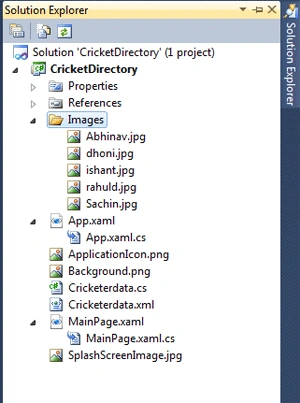
Add all the images into solution.
-
Add a new class named Cricketerdata.cs to get and set the values of the attributes to read the data from the XML file.
using System;
using System.Net;
using System.Windows;
using System.Windows.Controls;
using System.Windows.Documents;
using System.Windows.Ink;
using System.Windows.Input;
using System.Windows.Media;
using System.Windows.Media.Animation;
using System.Windows.Shapes;
namespace CricketDirectory
{
public class Cricketerdata
{
public int playerId { get; set; }
public string playerName { get; set; }
public string playerAge { get; set; }
public string playerBattingstyle { get; set; }
public string playerBowlingstyle { get; set; }
public string playerHeight { get; set; }
public string playerrole { get; set; }
public ImageSource playerImage { get; set; }
}
} -
Now come to the MainPage.cs file and write the following code.
using System;
using System.Collections.Generic;
using System.Linq;
using System.Net;
using System.Windows;
using System.Windows.Controls;
using System.Windows.Documents;
using System.Windows.Input;
using System.Windows.Media;
using System.Windows.Media.Animation;
using System.Windows.Shapes;
using Microsoft.Phone.Controls;
using System.Windows.Media.Imaging;
using System.Xml.Linq;
namespace CricketDirectory
{
public partial class MainPage : PhoneApplicationPage
{
public MainPage()
{
InitializeComponent();
SupportedOrientations = SupportedPageOrientation.PortraitOrLandscape;
}
private void button1_Click(object sender, RoutedEventArgs e)
{
if (textBox1.Text == string.Empty)
{
textBlock3.Visibility = System.Windows.Visibility.Visible;
listBoxAuthors.Visibility = System.Windows.Visibility.Collapsed;
}
else
{
textBlock3.Visibility = System.Windows.Visibility.Collapsed;
listBoxAuthors.Visibility = System.Windows.Visibility.Visible;
var element = XElement.Load("Cricketerdata.xml");
var player = from var in element.Descendants("player")
where var.Attribute("playerName").Value.ToLower().IndexOf(textBox1.Text.ToLower()) != -1
select new Cricketerdata
{
playerImage = GetImage(var.Attribute("playerImage").Value),
playerName = var.Attribute("playerName").Value,
playerAge = var.Attribute("playerAge").Value,
playerrole = var.Attribute("playerrole").Value,
playerBattingstyle = var.Attribute("playerBattingstyle").Value,
playerBowlingstyle = var.Attribute("playerBowlingstyle").Value,
playerHeight = var.Attribute("playerHeight").Value
};
if (player.Count() != 0)
{
listBoxAuthors.DataContext = player;
}
else
{
textBlock4.Visibility = System.Windows.Visibility.Visible;
listBoxAuthors.Visibility = System.Windows.Visibility.Collapsed;|
}
}
}
public ImageSource GetImage(string path)
{
return new BitmapImage(new Uri(path, UriKind.Relative));
}
private void button2_Click(object sender, RoutedEventArgs e)
{
textBox1.Text = "";
listBoxAuthors.Visibility = System.Windows.Visibility.Collapsed;
textBlock3.Visibility = System.Windows.Visibility.Collapsed;
textBlock4.Visibility = System.Windows.Visibility.Collapsed;
}
} -
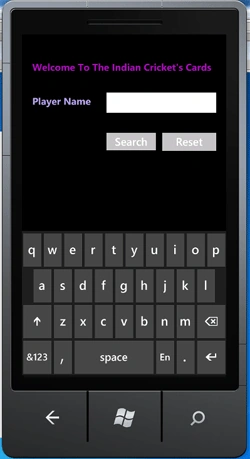
Now run the application and click on the textbox; the keyboard appears so you can type the player name from the keyboard.
-
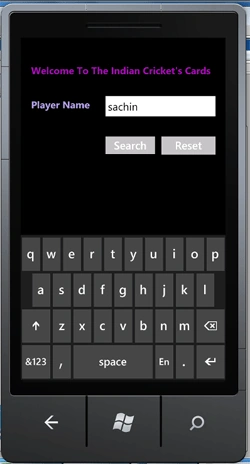
Type the player name and click on the search button:
Now here I explain the code above:
-
On the button1_click you see:
if (textBox1.Text == string.Empty)
{
textBlock3.Visibility = System.Windows.Visibility.Visible;
}
This if condition checks the text to determine which user was entered in the textbox; if the value is null than it will shows an error like in the figure below: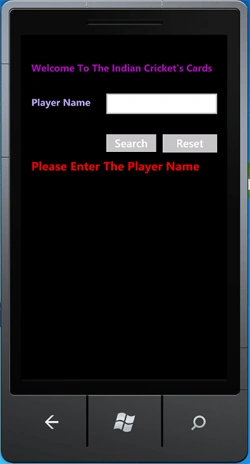
-
Now after the if statement the else statement checks the text through the IndexOf function; it checks the complete text and if the text exists in the XML records then all the matching records will be displayed.
else
{
textBlock3.Visibility = System.Windows.Visibility.Collapsed;
listBoxAuthors.Visibility = System.Windows.Visibility.Visible;
var element = XElement.Load("Cricketerdata.xml");
var player = from var in element.Descendants("player")
where var.Attribute("playerName").Value.ToLower().IndexOf(textBox1.Text.ToLower()) != -1
select new Cricketerdata
{
playerImage = GetImage(var.Attribute("playerImage").Value),
playerName = var.Attribute("playerName").Value,
playerAge = var.Attribute("playerAge").Value,
playerrole = var.Attribute("playerrole").Value,
playerBattingstyle = var.Attribute("playerBattingstyle").Value,
playerBowlingstyle = var.Attribute("playerBowlingstyle").Value,
playerHeight = var.Attribute("playerHeight").Value
};
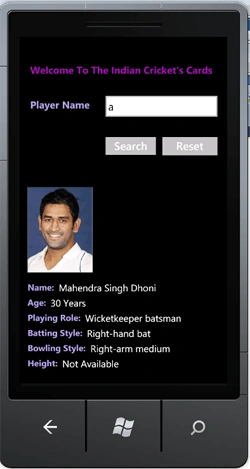
If the user writes the full name of the player like sachin and sachin exists in the XML the record will show and if the user only writes an a then all the player's records which have an a in his name will be shown and you will see all the records by scrolling the output: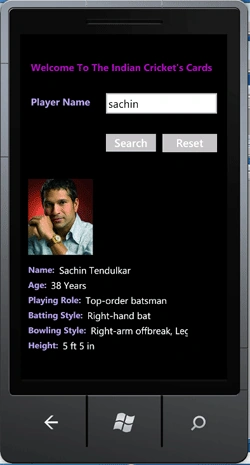
-
Now suppose the text entered by the user does not exist in the XML file, then what will happen?
if (player.Count() != 0)
{
listBoxAuthors.DataContext = player;
}
else
{
textBlock4.Visibility = System.Windows.Visibility.Visible;
listBoxAuthors.Visibility = System.Windows.Visibility.Collapsed;|
}
In that condition the another if-else statement which is inside the root if-else compares the output of the IndexOf function and shows the textblock4 that is an error message like the following figure shows:
-
At last button2_click resets all the listboxes and textboxes.
private void button2_Click(object sender, RoutedEventArgs e)
{
textBox1.Text = "";
listBoxAuthors.Visibility = System.Windows.Visibility.Collapsed;
textBlock3.Visibility = System.Windows.Visibility.Collapsed;
textBlock4.Visibility = System.Windows.Visibility.Collapsed;
}
When you click on the Reset button the application is again ready to search for player records: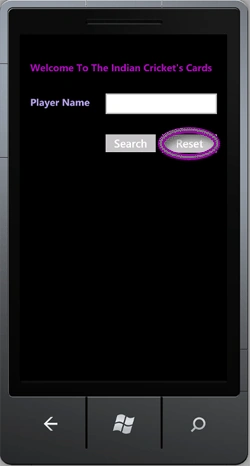
Cheers I hope you enjoy learning how to filter XML data and display in Windows Phone application and I look forward to read your comments.
priya jainPosted May 30, 2013, 7:30 AM
@Raj Kumar: http://www.c-sharpcorner.com/UploadFile/raj1979/how-to-use-xml-in-windows-phone-7/ ..its working properly but now i want that whenevr i click on list item ,it should display his full profile via source text block.what can i do ??
priya jainPosted May 30, 2013, 7:25 AM
if i want text block text back from emulator so what can i do ...pls help me out i got stuck.
ee rreditedPosted Aug 11, 2011, 3:06 PMEdited Aug 11, 2011, 3:36 PM
hi thanks for the article its very useful and it helps me a lot. but i have problem, which is that I'm trying to have two pages one to search for the data and another to display it. I'm trying to pass the page to another page so to display the data in it but i get error. can you please explain how can i do that. Thanks in Advance
Raj KumarPosted Jul 19, 2011, 12:03 AM
Good article, useful and well explained. Thanks