

Introduction
In this article, I will explain how to get the Task Hierarchy for a specific project in Project Server via T-SQL.
Scenario
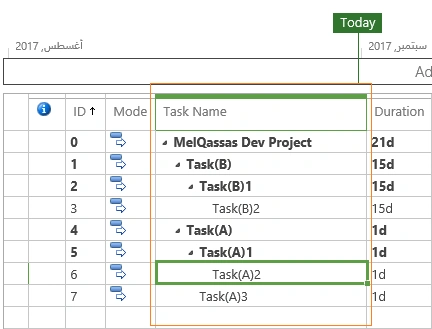
In Project Server, I have a project schedule with the summary task and subtasks, as shown below.
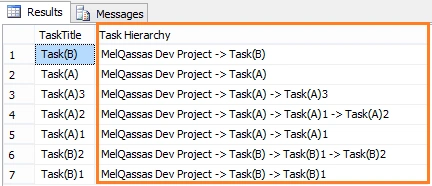
Based on the requirement, I would like to show the Task Hierarchy for each task in the Tasks View "[MSP_EpmTask_UserView]" for a specific project.
Steps
To get the Task Hierarchy, we will use the Recursive Queries Using Common Table Expressions, as shown below.
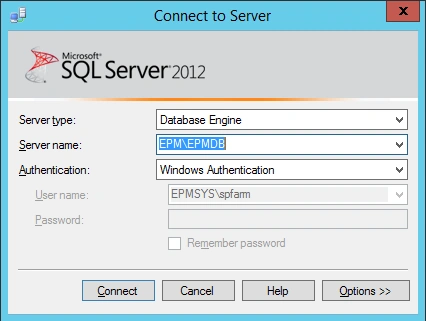
- Open Microsoft SQL Management Studio > Connect to the SQL Server Instance.
- Create a "New Query" and make sure that you are using the Project Database (in this article, the project database name is "ProjectWebApp").

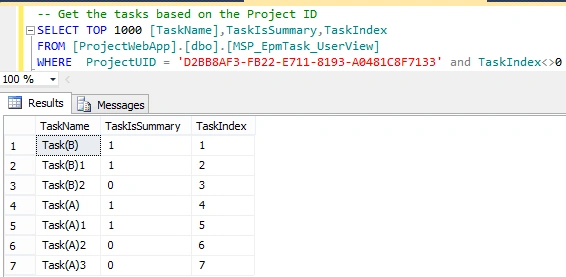
- Get the Tasks for a specific project based on its ProjectUID from the form "[MSP_EpmTask_UserView]" View, as shown below.
- Note. Change the ProjectUID with your ProjectUID.
SQL
-- Get the tasks based on the Project ID
SELECT TOP 1000 [TaskName],TaskIsSummary,TaskIndex
FROM [ProjectWebApp].[dbo].[MSP_EpmTask_UserView]
WHERE ProjectUID = 'D2BB8AF3-FB22-E711-8193-A0481C8F7133' and TaskIndex<>0
- Note. Change the ProjectUID with your ProjectUID.
- As we have mentioned, we will use the Recursive Queries Using Common Table Expressions to get the Task Hierarchy as the below query.
- Note. Change the ProjectUID with your ProjectUID.
SQL
WITH TasksRecursive(
  ProjectUID, TaskTitle,  TaskUID,
   TaskParentUID,  TaskName,  Level
)    AS   (
     SELECT ProjectUID,
  TaskName as TaskTitle,
   TaskUID,
   TaskParentUID,
   CAST(
    TaskName AS NVARCHAR(MAX)
  ),
   0   FROM dbo.MSP_EpmTask_UserView WITH(NOLOCK)    WHERE TaskIndex  <>  0   UNION ALL   SELECT UV.ProjectUID,
  TasksRecursive.TaskTitle,
  TasksRecursive.TaskUID,
  UV.TaskParentUID,
  CAST(
    UV.TaskName ASNVARCHAR(MAX)
  )   +   ' -> '   +  CAST(
    TasksRecursive.TaskName AS NVARCHAR(MAX)
  )  ,
   TasksRecursive.Level  +  1   FROM TasksRecursive   Inner JOIN dbo.MSP_EpmTask_UserView UV WITH(NOLOCK)    ON TasksRecursive.ProjectUID  =  UV.ProjectUID AND TasksRecursive.TaskParentUID  =  UV.TaskUID   WHERE TaskIsSummary  =  1 AND TasksRecursive.TaskParentUID  <>  UV.TaskParentUID
)    SELECT X.TaskTitle,
   (
  select TaskName from MSP_EpmTask_UserView where TaskIndex  =  0 and ProjectUID  =   'D2BB8AF3-FB22-E711-8193-A0481C8F7133'
)   +   ' -> '   +  X.TaskName as  'Task Hierarchy'    FROM TasksRecursive X   INNER JOIN (
  SELECT ProjectUID,
   TaskUID,
   MAX(Level)  as  'Level'  FROM TasksRecursive GROUP BY ProjectUID,
   TaskUID
)  Y   ON X.ProjectUID  =  Y.ProjectUID AND X.TaskUID  =  Y.TaskUID AND X.Level  =  Y.Level   WHERE X.ProjectUID  =   'D2BB8AF3-FB22-E711-8193-A0481C8F7133'
Run the query to get the desired result.
- Note. Change the ProjectUID with your ProjectUID.
Applies To
- Project Server 2010 Reporting Database.
- Project Server 2013 Database.
- Project Server 2016 Content Database.
In Project Server 2016, a single database (SharePoint Content Database) holds the project data and the content.
Conclusion
In this article, I have explained how to show the Task Hierarchy for a specific project in Project Server Database using T-SQL.
Join the conversation! Your thoughts help the community grow.